Best Free Chore Apps for Kids in 2026: What Is Actually Free?
- Jacob Volk
- Chore Apps
- 20 Sep, 2025
- Updated 07 Sep, 2026
Searching for a free chore app for kids is more frustrating than it should be.
We know because we have personally tried some of the apps in this category. Before building MyChoreBoard, we ran into the same pattern many parents do: download something that looks free, spend time adding the kids and chores, start figuring out how the family might use it — and then discover that the feature you actually need is part of a trial, subscription, device limit, or Premium plan.
That experience was one of the reasons we built MyChoreBoard.
We understand why software companies charge for their products. Apps cost money to build and maintain. But our goal with MyChoreBoard is different: we think every family should be able to use the tools that help kids become more independent and help a household run more smoothly, without having to decide which family features they can afford. That is why MyChoreBoard has no paid tier, no ads, and no feature gates.
For this 2026 update, we wanted to do more than make another list of apps that are “free to download.” We looked at what families actually get without paying, what gets locked behind Premium, whether children get a real child-facing experience, which devices are supported, whether a shared family display is possible, current store ratings, and whether each product still appears to be actively developed.
Disclosure: We make MyChoreBoard, one of the apps in this comparison. We are obviously not a neutral review site. We have tried to make this useful by showing where competitors do things MyChoreBoard does not, including parent approval, photo proof, and real bank transfers. We also label features as paid when we could verify a paywall instead of treating “feature exists” as the same thing as “feature is free.”
Pricing, ratings, platform support, and public feature information below were checked on September 7, 2026. App-store ratings and plans can change.
Looking for setup advice instead of a product comparison? Start with our guide to choosing and using a chore app for kids.
The first thing to know: “free” can mean four different things
A free download tells you almost nothing about what a family can actually use long-term.
In this article, we use these labels:
- ✓ Free — the feature is available indefinitely without paying.
- $ Paid — the feature exists, but requires a subscription or paid upgrade.
- ◐ Limited — there is a meaningful free restriction, such as one device or a small number of chores/users.
- ? Unclear — the feature exists, but the developer’s current public materials do not clearly tell us whether it is free or Premium.
- — — we could not verify a comparable feature.
That last distinction matters. We would rather put ? Unclear in a table than guess and accidentally tell a family that a paid feature is free.
Quick answer: which chore apps are actually free?
MyChoreBoard is not literally the only completely free chore app. We found at least one other genuine no-subscription option worth including here: the browser-based open-source app Pointsy.
What is unusual about MyChoreBoard is the combination: all features free, no ads, a kid-first interface, iPhone/iPad, Android, Amazon Fire tablets, a full browser version, free real-time multi-device sync, separate child-device use, and a purpose-built WallBoard that shows multiple children side by side on a shared household display. Among the products we verified for this comparison, we did not find another established option with that entire combination.
Here is the high-level breakdown before we get into individual features.
| App | Product focus | Free long-term? | Biggest free limitation | iOS | Android | Web | Amazon Fire |
|---|---|---|---|---|---|---|---|
| MyChoreBoard | Kid-first chores, routines, points & rewards | ✓ Everything free | None; no paid tier | ✓ | ✓ | ✓ | ✓ App |
| Pointsy | Kid chores, points & rewards | ✓ Everything free | Browser-only; no native iOS/Android apps | Browser | Browser | ✓ | Browser |
| Chores & Allowance Bot | Kids’ chores + detailed allowance tracking | ✓ Useful free tier | Family Chore Chart, shared task pool, rotation, advanced reminders and more are Premium | ✓ | ✓ | ✓ | Browser |
| Chorsee | Family chore management with child mode | ◐ Freemium | Free tier is limited to 10 chores; rewards require Premium | ✓ | ✓ | — | — |
| Chores Hero | Kid-first chores, points & rewards | ◐ Free on one device | Multi-device sync and Family Hub shared display require Premium | ✓ | ✓ | — | — |
| Homey | Kids’ chores + real-money/allowance education | ◐ Free up to 3 accounts | More than 3 family accounts and bank-transfer/premium wallet features require subscription | ✓ | ✓ | — | ✓ App |
| Sweepy | Household cleaning management | ◐ Freemium | Smart Schedule and subscription features; not primarily a kids’ chore system | ✓ | ✓ | — | — |
S’moresUp is not in this table because its current listing is essentially a trial model rather than a free long-term chore app. We cover it separately below.
We also removed Nipto from the main ranking. It supports families, but its core idea is dividing household work among families, couples, and roommates and competing on a weekly leaderboard. That can be fun, but it is not close enough to the kid-first chore-chart problem we are comparing here.
Current ratings, device support, and development activity
Features matter, but so does whether the app works on the devices your family actually owns — and whether it appears to still be maintained.
| App | Apple rating* | Google Play rating* | Multi-device sync without paying | Shared multi-child display | Development signal |
|---|---|---|---|---|---|
| MyChoreBoard | 4.9 / 47 | 4.8 / 44 | ✓ Free | ✓ Free — WallBoard | Very active; public Android update Aug. 2026 |
| Pointsy | N/A | N/A | ✓ Free via browser | — | New and actively developed; open source |
| Chores & Allowance Bot | 4.5 / 11K | 4.5 / 2.81K | ✓ Free | $ Paid Chore Chart | Maintained; last Google Play update Dec. 2025 |
| Chorsee | 4.6 / 12K | 4.4 / ~100+ | ? Tier not clearly published | ◐ Household chart/widgets, but no WallBoard equivalent verified | Very active; iOS update Sep. 2026 |
| Chores Hero | 4.6 / 14 | Not enough ratings shown | $ Paid | $ Paid — Family Hub | Very active/new; Android update Aug. 2026 |
| Homey | 4.1 / 2.8K | 2.8 / 626 | ✓ Free for free-plan accounts | — | Active but uneven; Android update Jan. 2026 |
| Sweepy | 4.7 / 10K | 4.5 / 18.4K | ? Subscription details vary by feature | — | Mature/maintained; Android update Nov. 2025 |
*Ratings were visible in the U.S. stores when we checked on September 7, 2026. They will move over time.
The rating differences are worth noticing. A product can have a strong reputation on one platform and a much rougher experience on another. Homey, for example, is 4.1 on Apple’s App Store but 2.8 on Google Play, where recent reviews also mention recurring-task and support frustrations. That does not mean Homey is a bad product, but it is useful context if your family primarily uses Android.
Feature comparison: chore setup and the child experience
This is where a normal “has chores / has rewards” comparison stops being useful. The details matter.
| Feature | MyChoreBoard | Chores & Allowance Bot | Chorsee | Chores Hero | Homey |
|---|---|---|---|---|---|
| Advanced scheduling | ✓ Free | ◐ Basic free; rotation/time-based advanced tools $ Paid | ✓ Exists; free tier has 10-chore cap | ✓ Free on one device | ✓ Free within 3-account plan |
| Unlimited kids | ✓ Free | ✓ Free | ? Public free-limit matrix unclear | ✓ Free on one device | $ Paid beyond 3 total accounts |
| Unlimited chores | ✓ Free | ✓ Free | ◐ 10 chores free; $ Paid beyond that | ✓ Free on one device | ? No chore-count cap published |
| Unlimited rewards | ✓ Free | — Not a traditional reward-shop system | $ Paid rewards | ✓ Free on one device | ? Rewards are part of free basic plan; limits not clearly published |
| Dedicated child interface | ✓ Free | ✓ Free | ✓ Exists | ✓ Free on one device | ✓ Free within 3-account plan |
| Child can use own device | ✓ Free | ✓ Free | ✓ Exists; tier details unclear | ◐ One-device use free; family sync $ Paid | ✓ Free within 3-account plan |
| Shared multi-child display | ✓ Free — purpose-built WallBoard | $ Paid — family Chore Chart | ◐ Household chart/widgets; no WallBoard-style child display verified | $ Paid — Family Hub | — Shared device switches profiles |
| Shared task pool / first kid claims it | ✓ Free — Shared Task Pool | $ Paid — Up-For-Grabs chores | ✓ Exists; tier details unclear | — | ✓ “Free for all” jobs exist; tier details unclear |
| Time-of-day organization | ✓ Free — Morning / Afternoon / Evening | $ Paid for advanced time-of-day reminders; no comparable child sections verified | — Comparable time-period sections not verified | ✓ Free — time blocks | ◐ Due times/schedules rather than a WallBoard-style day flow |
| One-time chores | ✓ Free | ✓ Free | ✓ Exists | ? Not clearly documented | ✓ Free within plan |
| Subtasks / checklists | ✓ Free | — Comparable checklist not verified | ✓ Exists; tier unclear | — Not verified | — Not verified |
Where Pointsy fits in this matrix
Pointsy is browser-only, so we kept it out of the already-wide table above, but its free feature set is worth calling out. Every Pointsy feature is free, and its current site advertises multiple kids, co-parent access, kid PINs, kids logging their own chores for parent approval, daily/weekly limits, take-turns rotation, and checklists. We did not verify a WallBoard-style shared display, photo proof, real-money transfer, or a first-claim Shared Task Pool equivalent.
Two rows deserve extra explanation.
A family overview is not automatically a WallBoard
Several apps can show a parent’s overview of the household. That is useful, but it is not the same thing as putting a tablet in the kitchen and giving multiple children their own visible, interactive chore boards side by side.
MyChoreBoard’s WallBoard Mode is designed for that central-screen use case. Chores Hero has a very similar idea called Family Hub, but its official site lists Family Hub as Premium only. Chores & Allowance Bot has an all-children Chore Chart, but WingBoat also lists that chart under Premium.
We have also tested WallBoard on a larger dedicated Android display; see our ApoloSign family command center setup.
That distinction matters if the screen itself is supposed to replace the whiteboard on the refrigerator.
“Shared chore” can mean several different things
We use Shared Task Pool to mean something specific: one optional chore is available to multiple children, but once one child takes/completes it, it disappears for the others.
Chores & Allowance Bot supports a comparable Up-For-Grabs model, but it is Premium. Chorsee also advertises chores that can be left open for whoever claims them first. Homey has “Free for all” Jobs. Those are different from simply assigning the same required chore to multiple kids.
Feature comparison: verification, rewards, money, and motivation
This table shows several areas where MyChoreBoard is intentionally not the most feature-rich option.
| Feature | MyChoreBoard | Chores & Allowance Bot | Chorsee | Chores Hero | Homey |
|---|---|---|---|---|---|
| Parent approval of completed chores | — | ◐ Payment/allowance approval ✓ Free; more automation $ Paid | ✓ Exists; tier unclear | ✓ Free on one device | ✓ Free within plan |
| Photo proof | — | ? Completion photos exist; current tier not clearly isolated | ✓ Exists; tier unclear | — | ✓ Exists |
| Bonus / optional chores | ✓ Free | $ Paid reward chores/pay-per-chore | ✓ Up-for-grabs chores exist; tier unclear | — Bonus points, but no comparable Bonus Task pool verified | ✓ Jobs can be optional/free-for-all |
| Savings goals | ✓ Free | ◐ Basic savings tools free; unlimited extra accounts/goals $ Paid | ◐ Virtual balance/rewards; dedicated savings-goal feature not verified | — Reward shop, no savings-goal feature verified | ◐ Free basics; unlimited saving jars $ Paid |
| Actual bank/money transfer | — | — Internal ledger/accounts, not direct bank transfer | — Virtual balance only | — Points only | $ Paid — U.S. bank transfer |
| Multilingual app interface | ✓ Free — English, Spanish & French | ✓ Free — English + 10 more App Store languages | — English only | — English only | — English only |
| Ads | None | No advertising model highlighted | No advertising model highlighted | None | No ad-supported model highlighted |
We think it is important to leave the — marks in the MyChoreBoard column.
If you want every chore to require a parent’s approval, MyChoreBoard does not currently do that. If you want kids to submit a photo as proof, MyChoreBoard does not currently do that either. And if the goal is to move real dollars into a child’s bank account, Homey is much closer to what you want.
A useful comparison should help you choose the right product, not make every row magically favor the product that wrote the article.
1. MyChoreBoard — best for a completely free, kid-first, cross-platform chore board
MyChoreBoard starts with a simple question:
What does the child need to do today?
That sounds obvious, but it creates a very different product from a household cleaning tracker or an allowance ledger.
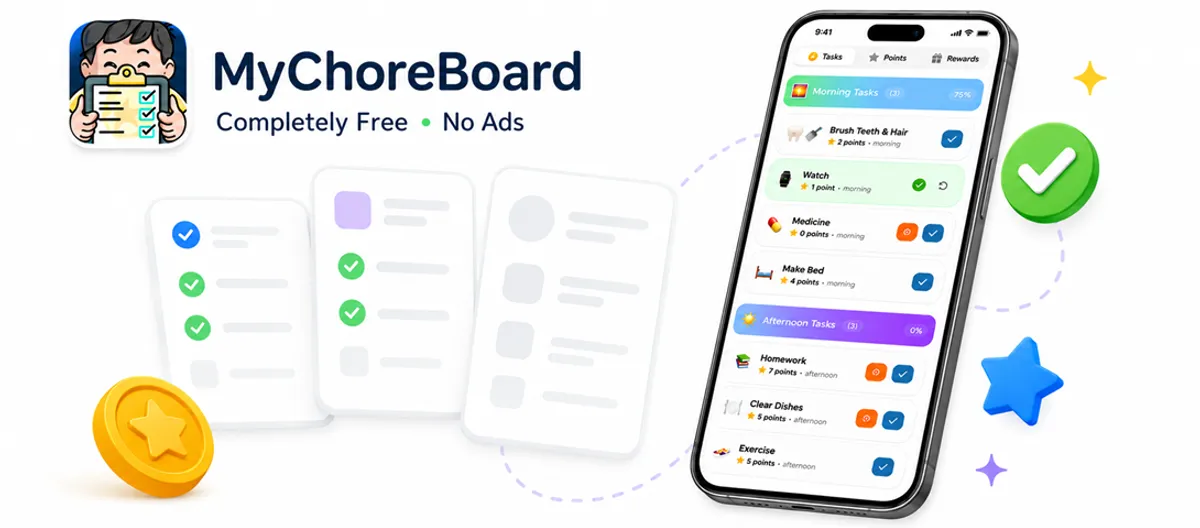
Children get their own task experience. Required chores can be organized by Morning, Afternoon, and Evening, while Bonus Tasks stay separate so optional earning opportunities do not make the required routine feel endless. Parents can create recurring tasks, one-time tasks, custom rewards, Savings Goals, and Shared Task Pool chores. Younger kids can use larger icons, while older kids can use the same system with points or an allowance-style value.
The other major difference is where the chore board can live.
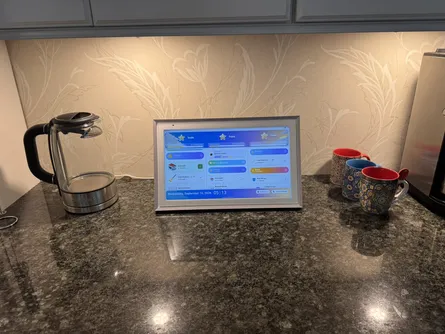
MyChoreBoard works on iPhone/iPad, Android, Amazon Fire tablets, and in a web browser. A parent can manage the family from one device while children use other devices. A kitchen tablet can run WallBoard Mode and show multiple kids at the same time. All of that is part of the same free product.
There is no “free version” versus “real version.” There is no Premium button that unlocks another tier of scheduling or another child. We intentionally do not have one.
Why we built it this way
Before MyChoreBoard, we tried some of the existing chore-app options ourselves. One of the things we found frustrating was not always knowing where the free experience ended until after we had already spent time setting things up.
There is nothing inherently wrong with subscriptions. Some of the apps below have years of development behind them and sophisticated features that cost money to operate. But we wanted to build a different model: if a feature helps a family use MyChoreBoard, we want that family to have it.
That philosophy is why features such as WallBoard, multi-device sync, unlimited kids, advanced scheduling, Shared Task Pool, Bonus Tasks, custom rewards, and Savings Goals are not separated into a paid tier.
Where MyChoreBoard is not the best choice
Choose another product if your top requirement is:
- photo proof, because MyChoreBoard does not currently require or collect completion photos;
- automatic transfer of real money, because MyChoreBoard tracks points/rewards rather than connecting to a child’s bank account.
MyChoreBoard’s public app-store interface is also currently English. Spanish and French localization are in progress, but we are not labeling that as a released multilingual feature until those versions are actually available.
What parents say after trying other chore apps
Because we built MyChoreBoard, our opinion is not neutral. One reason this comparison matters to us is that parents keep telling us they went through the same search we did: trying multiple chore apps, worrying about free trials, or looking for something their kids would actually use. Here are three short excerpts from public parent feedback:
“I downloaded several free chore apps to test, and My Chore Board was the clear winner.”
Kaylaco, App Store review
“I have tried so many apps, free and paid and yours is one that has stuck and the easiest to use.”
Sarah K., MyChoreBoard parent testimonial
“I searched for an app for several months… it seemed like a lot of work for a free trial I may not like.”
Melissa Simpson, Google Play review
Try MyChoreBoard free or see how WallBoard works on a shared family screen.
2. Chores & Allowance Bot — strongest free cross-platform alternative, but important family features are Premium
Chores & Allowance Bot deserves more credit than a lot of comparisons give it.
It has been around for years, has thousands of reviews, and is one of the few products in this category we verified on iOS, Android, and a real browser version. Its free tier is also genuinely useful: WingBoat says families can create as many children, chores, and allowances as they want, and synchronization between multiple devices is included for free.
For a family primarily interested in allowance accounting, it is a strong product.
But this is also a good example of why we did not want a simple “yes/no” feature table.
WingBoat’s own pricing page puts several chore-management features behind Premium, including:
- the Chore Chart that shows all children’s chores together;
- Up-For-Grabs chores, which are comparable to a shared task pool;
- automatic chore rotation;
- carrying unfinished chores forward;
- unlimited additional accounts and goals;
- advanced time-of-day reminders;
- automatic and partial allowance-approval rules;
- child passcodes and additional visibility controls.
The current U.S. App Store lists Premium at $9.99/month or $39.99/year.
That means CAB’s free tier is more generous than many freemium apps, but the exact features that make it more capable as a sophisticated shared family chore board are also where Premium starts to matter.
Best fit
Choose Chores & Allowance Bot if you want:
- a strong allowance ledger;
- free iOS + Android + web access;
- multiple children and chores without a free-tier count limit;
- savings/account tracking;
- optional photo completion and approval-oriented workflows.
Main tradeoff
If your priority is a shared kid-facing central display, shared task pool, rotations, or the most advanced chore-management features, expect to encounter the Premium tier.
3. Chorsee — excellent chore-management depth, but the free tier is meaningfully limited
Chorsee may be the strongest pure chore-management competitor in this group.
It supports flexible schedules, one or multiple assignees, rotating chores, chores that are up for grabs, notes, categories, reminders, subtasks, photo proof, allowance/points, custom rewards, multi-device syncing, and a dedicated Child Mode that keeps editing controls away from kids.
It also has a very clear product philosophy. Chorsee intentionally avoids turning chores into a game full of coins and badges. It is more of a clean family responsibility tracker with a child interface than a colorful kid reward game.
That may be exactly what some families want.
Chorsee is also actively being developed. Its iOS listing showed version 2.14.4 updated just days before this article was refreshed in September 2026.
The problem for a “best free apps” list
Chorsee’s public feature descriptions do not provide a clean current matrix showing which individual features are free versus Premium.
What we could verify from the current Google Play listing and recent reviews is important:
- a recent reviewer specifically identifies a 10-chore limit in the free tier;
- another 2026 reviewer says setting up rewards requires Premium;
- the U.S. App Store currently lists Premium at $8.99/month, $39.99/year, or $119.99 lifetime among its current purchase options.
So we would not describe Chorsee as “free with optional extras” without qualification. It has a useful free tier, but a family with several children can hit 10 chores very quickly.
Best fit
Choose Chorsee if you care most about:
- rotating responsibilities;
- first-come/up-for-grabs chores;
- subtasks;
- photo proof;
- a clean, less game-like family interface;
- a developer that is still shipping frequent updates.
Main tradeoff
The free chore count is restrictive for a larger family, rewards are paid, and there is no browser version or purpose-built WallBoard-style family display that we could verify.
4. Chores Hero — the closest WallBoard-style competitor, with the biggest distinction being the paywall
Chores Hero is newer and much smaller than Chores & Allowance Bot or Chorsee, but conceptually it is one of the closest products to MyChoreBoard.
It is explicitly built for kids. Children get chores, points, streaks, and a reward shop. Parents can verify completed chores, create flexible schedules, organize work into time blocks, and add unlimited family members, chores, and rewards.
And it has Family Hub, a landscape tablet view that shows every child’s chores and progress together.
That is very close to the central-display problem MyChoreBoard’s WallBoard is designed to solve.
The pricing difference is straightforward:
- Chores Hero says the full chore system is 100% free on one device.
- Real-time cloud synchronization across multiple family devices is Premium.
- Family Hub is Premium only.
Current pricing is $4.99/month, $34.99/year, or $79.99 lifetime.
So a family that plans to put the whole system on one shared tablet can get a lot for free. A family that wants Mom or Dad managing chores from one phone, one child completing chores upstairs on another device, and a shared display in the kitchen will need Premium.
Best fit
Choose Chores Hero if you want a modern, kid-first interface with built-in parent verification and you are comfortable either staying on one device or paying for family synchronization.
Main tradeoff
The two features that matter most for a distributed household — multi-device sync and the shared Family Hub — are the paid upgrade.
5. Homey — best when the goal is chores plus real money
Homey is genuinely designed around kids, but its center of gravity is different from MyChoreBoard.
Homey divides chores into Responsibilities and paid Jobs. It tracks allowance, wallets, savings jars, financial goals, and can connect chore earnings to a real bank account in the U.S. Premium plan.
That makes Homey a much more natural choice when the question is:
How do I use chores to teach my child about earning, saving, and real money?
rather than simply:
How do I make today’s routine obvious enough that my child can manage it independently?
Homey’s free tier is more generous than we initially assumed. Its current FAQ says basic chores, allowance, rewards, and notifications are completely free for families using up to three accounts, and those accounts can use as many devices as they want.
Premium is needed to add more than three users and unlocks features including unlimited family members, bank-account connection/transfers, multiple savings jars, wallet controls, and custom permissions. The current U.S. App Store lists $6.99/month or $59.99/year.
Where Homey is stronger than MyChoreBoard
Homey supports things MyChoreBoard deliberately does not:
- photo completion;
- parent completion confirmation;
- real-dollar Jobs;
- bank transfers in the U.S.;
- deeper money-management tools.
Where we would look carefully before committing
Homey’s current Apple rating is 4.1, while its Google Play rating is only 2.8. Recent Android reviews mention recurring responsibilities becoming “expired” and difficulty getting support responses.
That is not a reason to dismiss the app, but if your family is Android-heavy, we would test the exact workflow you need before moving the whole household into it.
6. Pointsy — truly free and browser-based
Pointsy is another product that prevents us from making an “only completely free app” claim.
It is a newer, open-source chore-and-reward system that runs in a browser instead of the native app stores. Its developer says every feature is free, there are no ads or subscriptions, and families can add multiple kids and a co-parent. Kids earn points for chores and redeem rewards rather than using real money.
Because it is browser-based, it can work on phones, tablets, and computers without a native download.
Pointsy is interesting if your priorities are:
- no subscription;
- no ads;
- open-source code;
- minimal child data;
- browser access;
- points and family-created rewards rather than banking.
It is also much newer and does not have the app-store review history of the larger products in this comparison. We did not find a dedicated WallBoard-style multi-child display.
7. Sweepy — excellent cleaning software, but we would not call it a kid-first chore chart
Sweepy is one of the most established and highly rated apps in this list: 4.7 with 10K Apple ratings and 4.5 with 18.4K Google Play reviews when we checked.
It can absolutely be used by families. Household members can share workload, compete on a leaderboard, and parents can review children’s work.
But its mental model starts somewhere different:
room → cleanliness → cleaning frequency → workload
rather than:
child → today’s responsibilities → completion → reward/progress
That distinction matters more than it might seem from a feature list.
Sweepy’s official site promotes its Smart Schedule, which automatically generates a cleaning list based on availability. The App Store lists a 3-day subscription trial and current pricing of $3.99/month or $19.99/year.
We would consider Sweepy if the main household problem is managing cleaning, especially among adults and older family members. We would not choose it first if the goal is to give younger kids an independent daily chore-and-reward interface.
Free to try is not the same as free: S’moresUp
S’moresUp is often included in “free chore app” lists because it is free to download.
We think that description is misleading without more context.
Its current Google Play listing describes access to Premium for 45 days or 450 completed chores, whichever comes first. After that, families are deciding whether to subscribe rather than simply continuing with the same complete free product.
S’moresUp is also broader than a chore chart. It combines chores with family planning, allowance/financial tools, rewards, and other family-management features.
That may be worth paying for if you want a broader family platform. But for this article, we put it in a separate category because a trial is not the same thing as a long-term free tier.
Why we left Nipto, iAllowance, and the old OurHome out of the main ranking
A useful comparison also needs to know what not to compare directly.
Nipto
Nipto can be used by families, but its core product is a household competition for families, couples, and roommates. We like the concept; it is simply not kid-focused enough for this particular ranking.
iAllowance
The established iAllowance product is currently a paid App Store download rather than a free chore app, and its public update history is much older than the actively developed products above. It can still be useful, but it does not belong in a 2026 list centered on what families can use for free.
OurHome
Older chore-app comparisons frequently recommend the original OurHome kids/family product. That old product is no longer the current app-store product people will find under the name. A newer OurHome by Elusios is a different household-organization app. We do not think it is helpful to keep recycling the old recommendation as though nothing changed.
Kid chore app vs. family chore app: the distinction we think matters most
After comparing these products, this may be more useful than arguing about which app has the longest checklist.
Kid-first chore/routine tools
These products are designed around the child’s interaction with today’s responsibilities:
- MyChoreBoard
- Chores Hero
- Pointsy, with a browser/points focus
Family chore-management tools with child support
These start from managing household responsibilities and then give children a role or child mode:
- Chorsee
- Chores & Allowance Bot, especially where allowance/accounting is central
- Homey, especially where financial literacy is central
Household cleaning/family-management tools
These can include kids, but kids are not the core mental model:
- Sweepy
- S’moresUp
- Nipto
Why does this matter?
Imagine a six-year-old walking into the kitchen before school.
A kid-first chore app is trying to answer:
What do I need to do next?
A household-management app is often trying to answer:
What work exists in this household, who is responsible for it, and how should we track it?
Both are valid. They simply produce very different interfaces.
The feature parents may underestimate: where the chore chart actually lives
We think device support deserves more attention than it gets in most app comparisons.
A parent can build the perfect chore system on their phone and still end up saying:
“Did you check your chores?”
all day long if the child cannot independently see the system.
Think about where your family will actually use it:
- Will a child check chores from their own phone in their bedroom?
- Will siblings share an iPad in the kitchen?
- Will a parent add a one-time task while away from home?
- Do you want a browser on a Chromebook, PC, or household display?
- Do you want several kids visible at the same time on a central screen?
Those are different requirements.
Three levels of “multi-device” support
1. The app can be installed on more than one phone.
This is common.
2. Parent and child can use different devices and changes synchronize without paying.
This is less common.
3. The family can also put a multi-child board on a shared central display.
This is rarer still.
Chores & Allowance Bot is one of the strongest competitors on level 2 because free synchronization works across iOS, Android, and compatible web browsers. But its all-children Chore Chart is Premium.
Chores Hero has a genuinely comparable shared-tablet idea in Family Hub, but both Family Hub and multi-device cloud sync are Premium.
MyChoreBoard includes all three levels free, which is why we think “cross-platform” undersells the actual difference.
Which app would we choose for each kind of family?
Choose MyChoreBoard if you want the full family system without a subscription
It is our pick for families that want a child-facing daily routine, flexible scheduling, rewards, Bonus Tasks, Shared Task Pool, free device syncing, and a central WallBoard without feature gates.
Choose Chores & Allowance Bot if allowance accounting matters more than a kid-first interface
Its free tier is unusually capable, its platform support is excellent, and its allowance/ledger tools go deeper than MyChoreBoard. Just look carefully at the Premium list if you want rotations, the all-family Chore Chart, or Up-For-Grabs chores.
Choose Chorsee if chore-management rules are the priority
Rotation, up-for-grabs work, photo proof, subtasks, and a clean child mode make it compelling. The tradeoff is that the free tier’s 10-chore limit and paid rewards can become relevant quickly.
Choose Chores Hero if you like a similar kid-first approach and want parent verification
It has a very modern feature set and a Family Hub concept close to WallBoard. It is especially attractive on one shared device; cloud sync and Family Hub are the features that move you into Premium.
Choose Homey if real money is the point
If you want responsibilities, paid Jobs, savings jars, and eventual bank transfers, Homey is solving a financial-literacy problem that MyChoreBoard intentionally does not.
Choose Pointsy if you want a free, private browser-based points system
It is a particularly interesting option for families that do not care about native app-store apps and value an open-source, no-bank-account model.
Choose Sweepy if cleaning the home is the problem
Sweepy is a strong cleaning-management product. We simply would not mistake that for the same thing as a child-first chore board.
Our bottom line
The biggest lesson from updating this comparison is that “free chore app” is too broad a category.
Some apps are genuinely free. Some have a useful free tier. Some are free on one device but charge when the family wants to sync. Some let you create chores for free and charge for rewards. Some make the shared family display Premium. And some are really trials wearing a free-download label.
That is exactly the frustration we remember from trying chore apps before building MyChoreBoard.
We did not want to build another product where a family spends an evening creating children, chores, rewards, and routines and then learns that the version they actually want is behind a subscription. Our goal is for every MyChoreBoard feature to be available to every MyChoreBoard family.
That does not automatically make MyChoreBoard the right app for everyone.
If you want parent approval or photo proof, there are competitors that do those things today. If you want real bank transfers, Homey goes much further. If you want household cleaning intelligence, Sweepy is more specialized.
But if what you want is a kid-first chore and reward system that works on iOS, Android, Amazon Fire tablets, and the web; can sync parents and children across devices; can live on a shared WallBoard; and does not turn advanced scheduling, extra kids, rewards, or shared-family features into an upsell, that is the product we are trying to build.
Web app
Use the Web App
Fastest way to start
Works on phones, tablets, and computers. No app store required.
- Great for getting a family set up right away.
- Use the same account across devices.
iPhone & iPad
Download on the App Store
Best for iPhone and iPad
Install the native iOS version from Apple’s App Store.
- Best choice for Apple mobile devices.
- Use the same account across devices.
Android
Get it on Google Play
Best for Android phones and tablets
Install the Android version from Google Play.
- Best choice for Android mobile devices.
- Use the same account across devices.
Amazon Fire
Get it on the Amazon Appstore
Best for Amazon Fire tablets
Install MyChoreBoard directly from the Amazon Appstore on your Fire tablet.
- Best choice for Amazon Fire tablets.
- Use the same account across devices.
Sources checked for this 2026 update
We used current first-party product pages and app-store listings wherever possible. When a developer did not publish a clear free-versus-Premium matrix, we said so instead of guessing.
- MyChoreBoard — Apple App Store
- MyChoreBoard — Google Play
- MyChoreBoard — Amazon Appstore
- Chores & Allowance Bot — official feature / free vs. Premium page
- Chores & Allowance Bot — Apple App Store
- Chores & Allowance Bot — Google Play
- Chorsee — official website
- Chorsee — Apple App Store
- Chorsee — Google Play
- Chores Hero — official website and free/Premium description
- Chores Hero — Apple App Store
- Homey — FAQ
- Homey — Apple App Store
- Homey — Google Play
- Pointsy — official site
- Pointsy — why it is free
- Sweepy — official site
- Sweepy — Apple App Store
- Sweepy — Google Play
- S’moresUp — Google Play
Frequently Asked Questions
- No. We found another genuinely free product worth including here: the browser-based Pointsy. What is unusual about MyChoreBoard is the combination of no paid tier, no ads, iOS, Android, Amazon Fire support, web access, free real-time multi-device sync, a kid-first interface, and a free shared WallBoard that can show multiple children side by side.
- We separate features into Free, Paid, Limited, Unclear, and Not Available. A feature is only labeled Free when we could verify that a family can continue using it without buying a subscription or upgrade. We do not treat a free download or temporary trial as the same thing as a completely free product.
- MyChoreBoard and Chores & Allowance Bot are the two established products in our main comparison that we verified across iOS, Android, and compatible web browsers. Both include multi-device synchronization without requiring payment, although Chores & Allowance Bot reserves its all-children Chore Chart and several advanced chore features for Premium.
- MyChoreBoard has a free WallBoard Mode designed to show multiple children’s chore boards side by side on a central household display. Chores Hero has a similar Family Hub tablet display, but its developer lists Family Hub as Premium only. Chores & Allowance Bot has an all-children Chore Chart, which is also listed as Premium.
- MyChoreBoard does not currently require parent approval or photo proof. Chorsee supports photo proof, Chores Hero supports parent verification, Homey supports completion confirmation and photo completion, and Chores & Allowance Bot supports photos and approval-oriented allowance/chore payment workflows. Check each app’s current plan because some developers do not publish a complete feature-by-tier matrix.
- Homey is the clearest option in this comparison for families that want chores tied to actual banking. Its Premium plan advertises connecting a bank account and transferring allowance or chore money to a child’s savings or checking account in the U.S. MyChoreBoard, Chorsee, Chores Hero, and Pointsy use points, virtual balances, rewards, or tracked allowance rather than moving money to a bank account.
- Nipto supports families, but it is designed more broadly for families, couples, and roommates who want to divide household work and compete on points. Because this article is specifically about kid-focused chore systems, we decided it was not a close enough comparison to rank alongside the child-first products.

Ready to try MyChoreBoard with your kids?
Install on any phone, tablet or computer. Free with no sign-in hoops.