Loading index…
New Feature: WallBoard Mode

New Feature: WallBoard Mode

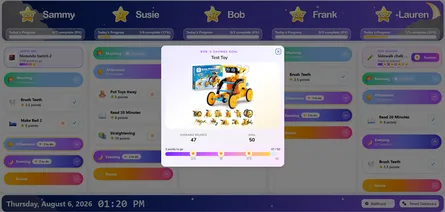
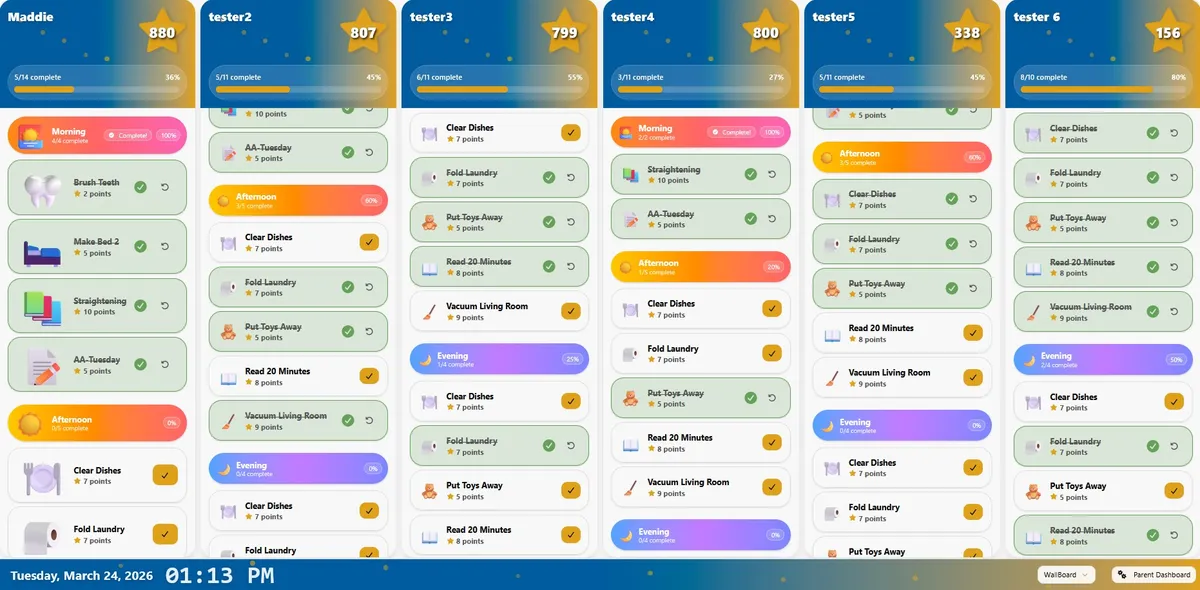
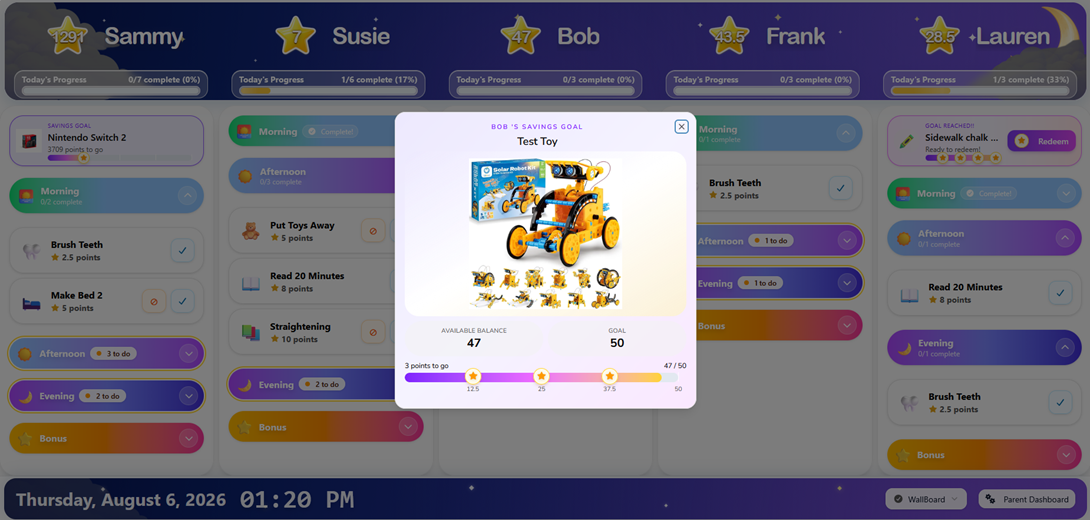
Sometimes it helps for the whole family to see everything at once. Instead of switching between child views, WallBoard Mode gives you a shared display that shows each child’s chores, progress, and points side by side on one screen. To make MyChoreBoard even more useful as a dedicated household device, we’ve added a new feature:

WallBoard Mode: A full-screen shared view designed for tablets and family command center setups.

Why we built this

Chore systems work best when expectations are visible. With WallBoard Mode, families can:

  • See multiple children at the same time
  • Check daily progress at a glance
  • Use a tablet as a shared household chore screen
  • Make routines feel more visible, clear, and consistent

This can be especially helpful for families who want a central screen in the kitchen, living room, or another shared space. If you’re building a more visible routine system at home, WallBoard Mode makes MyChoreBoard work even better as a dedicated family device.
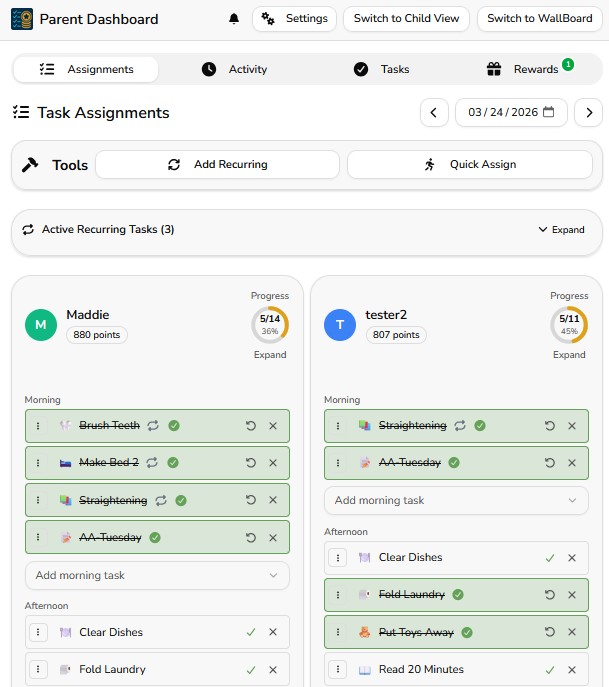

WallBoard Mode footer showing the date, time, and navigation controls

How it works

Using the new feature is simple:
  1. Open MyChoreBoard on your tablet or shared device
  2. Go to the Parent Dashboard and Click on Switch to WallBoard or
  3. From the “Child Interface” Click on WallBoard in the child drop down menu
  4. Place the device where the family can easily see it
  5. Let kids check their own column throughout the day
That’s it.

Try the new WallBoard Mode feature → Open MyChoreBoard


When you might use this feature

Parents may especially like WallBoard Mode when:

  • They have more than one child using MyChoreBoard
  • They want a shared screen in a central part of the house
  • Kids respond better when chores stay visible
  • They want a tablet to function like a dedicated family chore board
  • They want to reduce reminders by letting the screen do more of the work

This helps keep routines more obvious and accessible without adding more clutter or confusion.


We’re continuing to build MyChoreBoard around one goal: helping parents create clear routines and consistent expectations while keeping kids motivated.

If you’re already using MyChoreBoard, thank you. Your feedback continues to shape every update.

cta-image

Ready to try MyChoreBoard with your kids?

Install on any phone, tablet or computer. Free with no sign-in hoops.
Get Started Now
Available on Web iPhone & iPad Android

Related Posts

New Feature: Add Amazon Links to Specific Rewards

New Feature: Add Amazon Links to Specific Rewards

Rewards work best when kids know exactly what they are working toward. MyChoreBoard now lets parents add an Amazon link to a specific reward, making it easier to connect point

read more
Smarter Recurring Chore Scheduling

Smarter Recurring Chore Scheduling

Family routines are rarely as simple as “every day” or “every Monday.” Some chores happen every other day. Some happen every few weeks. Some only matter during certain seasons. So

read more
How Bonus Tasks Work in MyChoreBoard

How Bonus Tasks Work in MyChoreBoard

Required chores are important, but optional chores can be powerful too. That is why MyChoreBoard now includes Bonus Tasks — a separate area for extra chores kids can complete

read more
Chore App for Kids: Build Chores, Rewards, and Routines That Work

Chore App for Kids: Build Chores, Rewards, and Routines That Work

A good chore app for kids should do more than track who took out the trash. The real goal is bigger than that. Parents want kids to build responsibility, follow routines, hel

read more
Family Rollout Plan: Getting Kids Onboard with a Chore App

Family Rollout Plan: Getting Kids Onboard with a Chore App

Getting your kids excited about a new chore app isn’t just about tech — it’s about psychology. Families succeed when they roll it out with clear expectations, fun rewards, and a sh

read more
Focus Mode: Help Kids Complete Chores One Step at a Time

Focus Mode: Help Kids Complete Chores One Step at a Time

Some kids do great with a full list. Other kids see a full list and freeze. Focus Mode is built for the second group. With the latest MyChoreBoard update, Focus Mode helps kids m

read more
MyChoreBoard Is Now Available in the App Stores

MyChoreBoard Is Now Available in the App Stores

Installing MyChoreBoard just got easier. MyChoreBoard is now available in the app stores, giving families a more familiar way to install the free chore and rewards app on phon

read more
MyChoreBoard’s Biggest Update Yet: Bonus Tasks, Focus Mode, Smarter Scheduling, and More

MyChoreBoard’s Biggest Update Yet: Bonus Tasks, Focus Mode, Smarter Scheduling, and More

MyChoreBoard is now live in the app stores, and this is our biggest feature release since launch. After a few smaller updates, this release brings together several improvement

read more
New Feature: Manually Add & Subtract Points

New Feature: Manually Add & Subtract Points

Not every important parenting moment shows up as a scheduled chore. Sometimes a child helps a sibling, puts in extra effort on homework, or handles a tough situation really well. O

read more
New Feature: Invite Another Parent or Guardian

New Feature: Invite Another Parent or Guardian

Managing a household does not always fall on just one adult. Sometimes chores, rewards, routines, and responsibilities need to be managed by a co-parent, grandparent, guardian, or

read more
What’s New in MyChoreBoard: Progress Charts, Big Icons & a Smoother Experience

What’s New in MyChoreBoard: Progress Charts, Big Icons & a Smoother Experience

We’ve been busy behind the scenes making MyChoreBoard even more helpful for families.This update adds two major new features — and a few invisible improvements — that make t

read more
Make Rewards Feel Real: Add Photos to MyChoreBoard Rewards

Make Rewards Feel Real: Add Photos to MyChoreBoard Rewards

Kids stay motivated longer when they can see the reward they’re earning.That’s why we’re excited to introduce one of our most requested features:Add Images to Rewards

read more
How to Save MyChoreBoard to Your Home Screen and Use It Like an App

How to Save MyChoreBoard to Your Home Screen and Use It Like an App

A lot of parents hear the phrase Progressive Web App and assume it is something technical or developer-y. It is not. In real life, it simply means you can save MyChoreBoard t

read more
What Is a Shared Task Pool?

What Is a Shared Task Pool?

Some chores belong to one child. Others are more like open opportunities. That is where Shared Task Pool comes in. Shared Task Pool is part of Bonus Tasks in MyChoreBoard

read more
How to Switch from a Whiteboard to a Free Chore App (In One Weekend)

How to Switch from a Whiteboard to a Free Chore App (In One Weekend)

If your whiteboard chore chart is covered in half-erased checkmarks and good intentions, you’re not alone. Most families outgrow paper systems once routines start to slip or multip

read more
More Enhancements: Category Filters, Quick Assign & 24-Hour Clock

More Enhancements: Category Filters, Quick Assign & 24-Hour Clock

The big features get the attention, but small setup improvements often make the biggest difference day to day. This MyChoreBoard update includes several parent-facing improvements

read more
2026's Resolution: Achieving a Calmer & More Organized Home

2026's Resolution: Achieving a Calmer & More Organized Home

The New Year has a way of making everything feel possible. We imagine calmer mornings, cleaner counters, fewer reminders, and a home that just runs better. January brings that qui

read more
Rewards That Motivate Kids (5–8): Small Wins Build Responsibility

Rewards That Motivate Kids (5–8): Small Wins Build Responsibility

If the toddler years were “Right Now, Please,” ages 5–8 are “Watch This!” Kids in this stage love to show what they can do, which makes it the perfect time to build **daily

read more
Motivating Teens: Shift to Trust, Goals, & Real-World Wins

Motivating Teens: Shift to Trust, Goals, & Real-World Wins

Teens don’t want stickers. They want respect, freedom, and the aux cord.The good news? Those are exactly the kinds of rewards that help build real-world responsibility w

read more
Age-Appropriate Rewards for Toddlers: Simple, Immediate & Fun

Age-Appropriate Rewards for Toddlers: Simple, Immediate & Fun

If your toddler could write their autobiography, Chapter One would be called “Right Now, Please.” At ages 2–4, kids live in the present tense, which is exactly why **simple, im

read more
Motivating Tweens: Build Independence Without Power Struggles

Motivating Tweens: Build Independence Without Power Struggles

If ages 5–8 were “Watch this!”, the tween years (9–12) are “Let me choose.” Tweens crave a voice in how things happen, which is perfect, because voice and choice are

read more
Best Free Chore Apps in 2025: Honest Feature Comparison

Best Free Chore Apps in 2025: Honest Feature Comparison

Choosing the right chore app can make or break your family’s daily flow. Some apps promise motivation but end up turning chores into competitions. Others look simple at first—until

read more
Why Families Are Choosing Family Chore Apps

Why Families Are Choosing Family Chore Apps

Parenting in the Age of Overwhelm Parenting today feels like managing a mini start-up — school projects, sports schedules, meals, and the endless question: *“Did anyone feed th

read more
2025's Ultimate Guide to Free Chore Apps

2025's Ultimate Guide to Free Chore Apps

If you’re a parent, your brain is basically a to-do list on overdrive. Between remembering who needs pajamas for spirit day, who has soccer practice, and whether the dog’s been fed

read more
How Positive Reinforcement Builds Motivation & Responsibility in Kids

How Positive Reinforcement Builds Motivation & Responsibility in Kids

Parents don’t need more nagging power. They need a motivation system that kids actually respond to. That’s what positive reinforcement delivers: clear expectations, inst

read more