Best Family Command Centers for Chores (2026)
- Jacob Volk
- Family Command Center , Chore Apps
- 09 Nov, 2026
A good digital family calendar can make schedules visible. A good family command center can go further and help everyone in the house know what is happening, what needs to get done, and what they are working toward. But the products in this category take very different approaches once chores and kids’ routines become part of the decision.
I have used DAKboard for years in my own kitchen and have tested ApoloSign extensively with MyChoreBoard. For Skylight, Hearth, and Cozyla, the comparisons below are based on their current product pages and support documentation rather than pretending I have lived with hardware I have not personally tested.
That distinction matters because this is not a generic “which screen has a calendar?” comparison. I am looking at these products through a more specific question:
Which family command center makes the most sense when chores, routines, rewards, and kids actually using the screen are important?
How I evaluated these family command centers
- Calendar usefulness: shared schedules, profiles, calendar sync, and at-a-glance visibility.
- Chore depth: recurring work, routines, shared jobs, optional work, instructions, and scheduling flexibility.
- Rewards: points or stars, reward goals, redemption, and parent controls.
- Child experience: whether the interface helps kids independently understand what to do next.
- Customization: how much control you have over layouts, widgets, screen size, and other household information.
- Openness: whether the display can run third-party apps, websites, or broader smart-home tools.
- Ongoing cost: which family-management features require a subscription.
Disclosure: I am the creator of MyChoreBoard. I purchased the ApoloSign I tested myself before joining its affiliate program, and I have used DAKboard independently for years. Neither company paid for these opinions. I have not personally tested Skylight, Hearth, or Cozyla hardware for this article, so I rely on their current official documentation where I discuss those products.
Quick answer: which family command center is the best fit?
There is not one winner for every family. These products are solving overlapping but different problems.
| If your priority is… | I would look at… | Why |
|---|---|---|
| A polished family calendar that is easy to understand | Skylight | A focused appliance with strong calendar, chore, routine, list, and mobile-app tools. |
| Kid routines and habit building in one guided ecosystem | Hearth | Routines, visual cues, to-dos, streaks, stars, and rewards are central to the product. |
| An open Android family display without a required subscription for core tools | ApoloSign | Google Play, Android widgets, built-in family tools, several screen sizes, and no required subscription for the core setup I tested. |
| A larger, highly capable Android family hub with strong native family tools | Cozyla | Custom dashboards, Google Play, chores, routines, rewards, meal tools, and 24- or 32-inch hardware. |
| Maximum layout and hardware customization | DAKboard | Build your own screen or buy ready-made hardware, then combine calendars, websites, Home Assistant, weather, photos, and far more. |
| The deepest chore-specific workflow | MyChoreBoard on a compatible screen | A dedicated chore system can add optional Bonus work, Shared Pool chores, N/A handling, checklists, Savings Goals, and child-focused views without requiring your family calendar to do everything. |
If all you need is a shared calendar and a few recurring tasks, any of the major family-calendar products may be enough. The differences get much more important when you want the screen to become part of how your kids actually manage responsibilities every day.
Family command center comparison at a glance
| Product | Hardware approach | Chores / routines | Rewards | Ongoing cost for the relevant family tools | Openness / customization | MyChoreBoard fit |
|---|---|---|---|---|---|---|
| Skylight | Dedicated Calendar hardware in several sizes | Chores, routines, descriptions, repeating schedules, and Up for Grabs tasks | Stars and Rewards | Rewards require Calendar Plus, currently $79/year | Focused Skylight experience; strong built-in tools | I did not find a supported way to install or embed MyChoreBoard on the display |
| Hearth | 27-inch dedicated wall display | Custom routines, recurring to-dos, shared “Anyone” tasks, filters, streaks | Stars and custom rewards | Membership unlocks routines, to-dos, stars/rewards and other premium tools; currently $9/month or $86.40/year | Purpose-built Hearth ecosystem | I did not find a supported third-party app or website integration for MyChoreBoard |
| Cozyla Calendar Plus | 24- and 32-inch Android family displays | Chores, routines, to-dos, repeat rules, points, multiple chore types | Stars, customizable rewards, approval | Core Calendar Plus features are free; optional Super membership adds advanced AI/art features | Very open: custom widgets, dashboards, Google Play | Promising because it supports Google Play; I have not personally tested MyChoreBoard on Cozyla yet |
| ApoloSign | 15.6-, 21.5-, and 27-inch Android displays | Routines, to-dos, points, rewards | Built in | Core calendar, chores, rewards, to-dos, and photos do not require a subscription; optional AI can | Open Android, Google Play, widgets, split-screen | Tested: MyChoreBoard installs normally from Google Play and works well |
| DAKboard | DIY, DAKboard CPUs, or ready-made touch displays | Native Family Chores Manager plus integrations | Points/rewards in native chore manager | MyChoreBoard iframe/custom-layout setup needs Essential: currently $6/month or $5/month billed annually | Most customizable: custom layouts, iframe, widgets, CSS, Home Assistant, many integrations | Tested: MyChoreBoard works in the Website/iframe block |
Prices and subscription terms above were checked in November 2026 and can change. I link to the current official product or pricing pages in each section below.
First: a digital family calendar and a family command center are not exactly the same thing
The terms get used interchangeably, but I think there is a useful distinction.
A digital family calendar is primarily trying to answer:
- Where does everyone need to be?
- What is happening today and this week?
- What meals, reminders, or lists should the family see?
A family command center starts with those questions but usually becomes a broader shared interface for the home:
- What does each child need to do?
- What chores are still available?
- What reward is a child working toward?
- What is happening with the smart home?
- What information should be visible across the room?
- Should this screen also run apps, photos, media, weather, or other household tools?
That difference explains why products that look very similar in an ad can feel very different after you put them on the wall.
Skylight Calendar: the straightforward appliance-style option
Skylight is one of the best-known dedicated family-calendar products, and its current feature set is much deeper than a calendar alone.
Skylight’s own documentation now separates Tasks into Chores and Routines. Chores can be one-time or repeating and can be assigned to one or more profiles. Routines can repeat daily or weekly and can be assigned to Morning, Afternoon, and Evening. Skylight also supports Up for Grabs tasks, which is particularly relevant for families that want an unassigned household job to be completed by whoever claims it first.
Its current Tasks interface includes day and week views, progress tracking, descriptions, profile filters, and late-task filtering. That makes it substantially more chore-capable than older “calendar with a checklist” descriptions suggest.
Where the subscription becomes important is Rewards. Skylight’s Rewards feature is part of Calendar Plus. Parents assign stars to tasks, and kids can track progress toward profile-specific rewards and redeem them on the display. Calendar Plus is currently listed at $79/year.
Official references: Skylight Calendar, Tasks: Routines and Chores, and Rewards.
Where I think Skylight fits best
Skylight makes sense for a family that wants to buy a polished product, connect calendars, create profiles, add chores and routines, and stay mostly within one cohesive interface.
The tradeoff is that the product is designed around the Skylight ecosystem. In the current documentation I reviewed, I did not find a supported method for installing arbitrary third-party apps or embedding a website such as MyChoreBoard directly on the Calendar display.
That is not necessarily a weakness. A closed, focused product can be exactly what someone wants. It just means you should be comfortable with Skylight’s own task and reward model before buying the hardware primarily for chores.
Hearth Display: strong when routines and independence are the center of the system
Hearth is the product I would look at most closely if the family command center is supposed to be as much about daily routines and child independence as it is about calendars.
Hearth’s current product emphasizes visual routines, recurring to-dos, filters, streaks, stars, rewards, and a companion app. Its Anyone to-dos are especially interesting: a shared household task can be available to anyone, and the person who completes it gets credit.
That is conceptually similar to the idea behind shared claimable chores, although the overall system remains Hearth’s own routine/to-do model.
Hearth’s Stars & Rewards system lets kids earn stars from routines and to-dos, while parents create custom rewards and can track progress from the companion app. Hearth also leans heavily into kid-friendly visual routines and different routine views rather than treating children as small project-management users.
Official references: Hearth features, Hearth Display, and Family Membership.
The subscription matters more here
The 27-inch Hearth Display can still show its core calendar, calendar sync, profiles, and settings without an active membership. But the features that make Hearth especially interesting for this comparison—routines, to-dos, meal planning, stars, rewards, and Hearth Helper—are membership features.
At the time I checked, membership was $9/month or $86.40/year, with longer pre-paid options available.
So I would not evaluate Hearth based only on the hardware price. If routines and rewards are why you are buying it, include the membership in the long-term cost comparison.
Cozyla Calendar Plus: the most interesting all-in-one Android competitor
Cozyla has become much more relevant to this category because its current Calendar Plus platform combines two things that do not always coexist: a full family-management interface and an open Android environment.
The current Calendar Plus 3 is offered in 24- and 32-inch versions. Cozyla lists a customizable dashboard, family profiles, shared calendars, chores, routines, to-dos, rewards, habit tracking, meal planning, grocery tools, parental controls, a companion app, and Google Play support as core features.
Its chore model is also more nuanced than a basic checklist. Cozyla documentation describes chore types including Individual, Compete, and Rotate. In Compete mode, multiple selected family members can see the job and the first one to complete it gets the stars. Rewards can be configured with star costs, renewable status, who can redeem them, and optional parent approval.
Official references: Cozyla Calendar Plus 3, Cozyla membership, and Cozyla reward settings.
Cozyla’s openness is a major differentiator
Cozyla explicitly supports third-party apps through Google Play and lets families build custom dashboards with movable widgets. That means the display is not limited to the manufacturer’s family-calendar interface.
Because MyChoreBoard has an Android app, Cozyla is an obvious candidate for running MyChoreBoard directly from Google Play. I have not tested that combination myself yet, so I am not going to call it verified until I do.
The same caution applies to layout behavior: I know what Cozyla documents, but I have not yet lived with one in my kitchen the way I have with DAKboard or tested one the way I tested ApoloSign.
Subscription model
For Calendar Plus devices, Cozyla currently lists the main dashboard, calendar, routines, chores, to-dos, rewards, meal planning, app store, companion app, and related family tools as free core features. Its optional Super membership primarily expands advanced AI and art features.
That makes Cozyla substantially different from products where the chore/reward system itself sits behind the recurring subscription.
ApoloSign: my favorite tested option if you want Android openness without a required core subscription
I bought and tested a 15.6-inch ApoloSign because I wanted a shared family calendar and a bigger MyChoreBoard display without locking myself into another monthly software bill.
The most important thing about ApoloSign is that it has two personalities.
In Calendar Mode, it behaves like a dedicated family calendar with calendars, routines, to-dos, points, rewards, meals, stickies, and photos.
In Android Mode, it becomes a much more general-purpose screen. It has Google Play, supports Android widgets, and can run other apps—including MyChoreBoard.
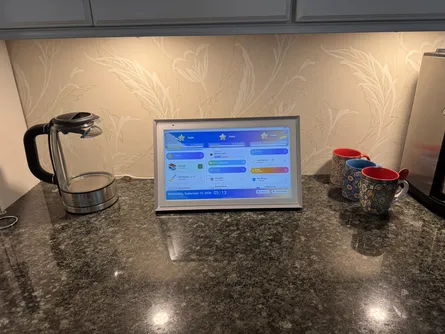
That openness ended up being more valuable to me than I expected. I have used the same 15.6-inch unit for MyChoreBoard, the family calendar, Google Photos, split-screen experiments, and even as an occasional small kitchen screen for sports.
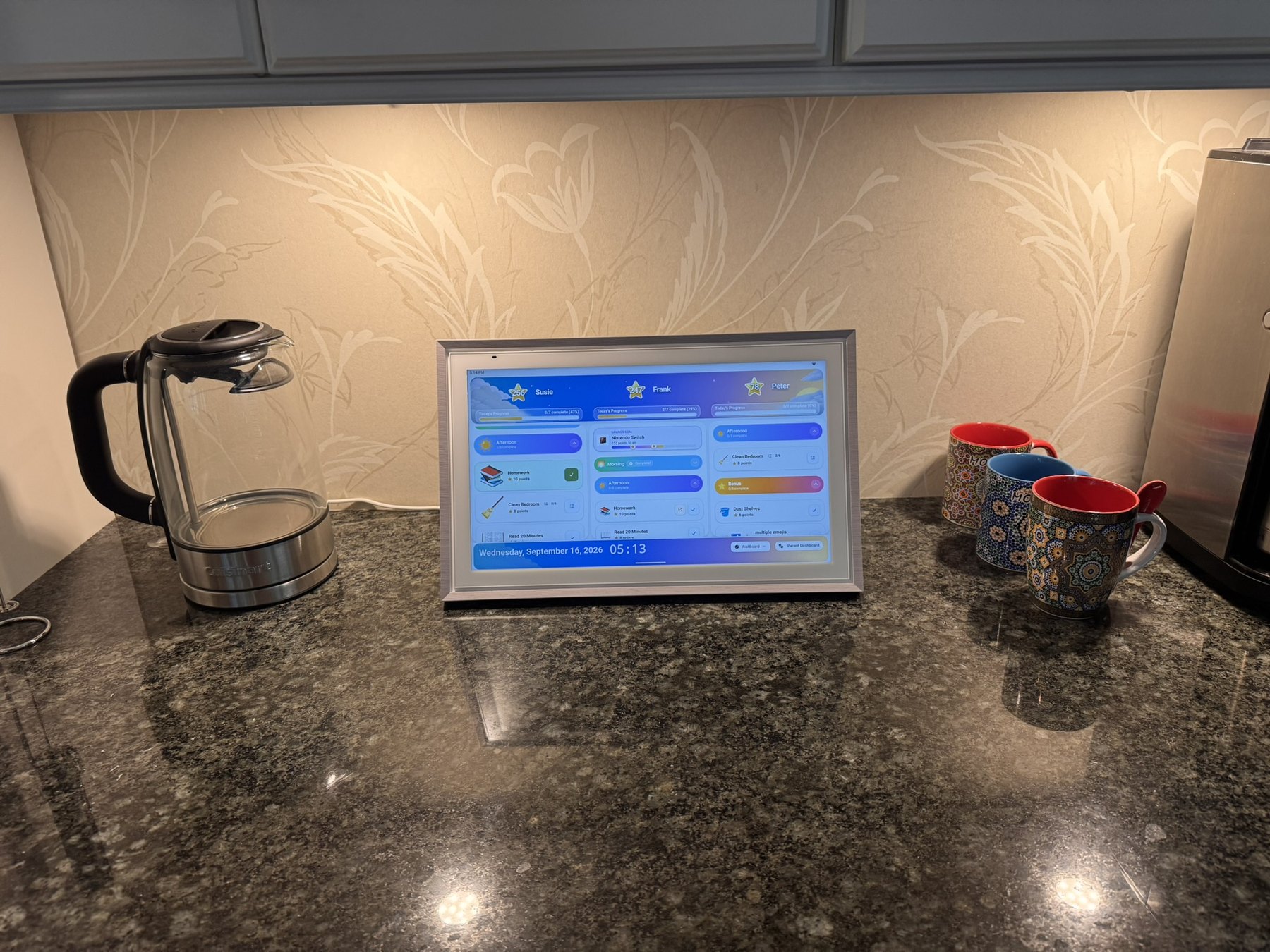
My 15.6-inch ApoloSign running MyChoreBoard WallBoard. This is one of the two command-center platforms in this comparison that I have personally tested with MyChoreBoard.
ApoloSign currently says its core calendar, chores, rewards, to-dos, and photo features are free for lifetime use, while advanced AI functionality can be optional subscription territory.
Read my full hands-on test: ApoloSign Review: Building a Family Command Center With No Monthly Subscription.
Where the built-in chore system falls short for me
ApoloSign has a real routine/points/rewards system, and it may be perfectly adequate for a family that wants straightforward recurring responsibilities.
In my testing, though, it did not have enough chore-specific workflow depth to replace MyChoreBoard for the way I manage responsibilities. I did not find equivalents for MyChoreBoard’s Shared Pool, N/A handling, separate required-versus-optional work model, task checklists, or the more advanced Bonus Task availability controls.
That is why ApoloSign + MyChoreBoard makes more sense to me than choosing between them. The ApoloSign handles the command center; MyChoreBoard handles the chores.
DAKboard: the most customizable option by a wide margin
DAKboard is the odd one out in this comparison because it is less like a single appliance ecosystem and more like a display platform.
I have used DAKboard for years, originally with a Raspberry Pi and a 24-inch monitor in my kitchen. What has always kept me using it is the amount of control it gives me.
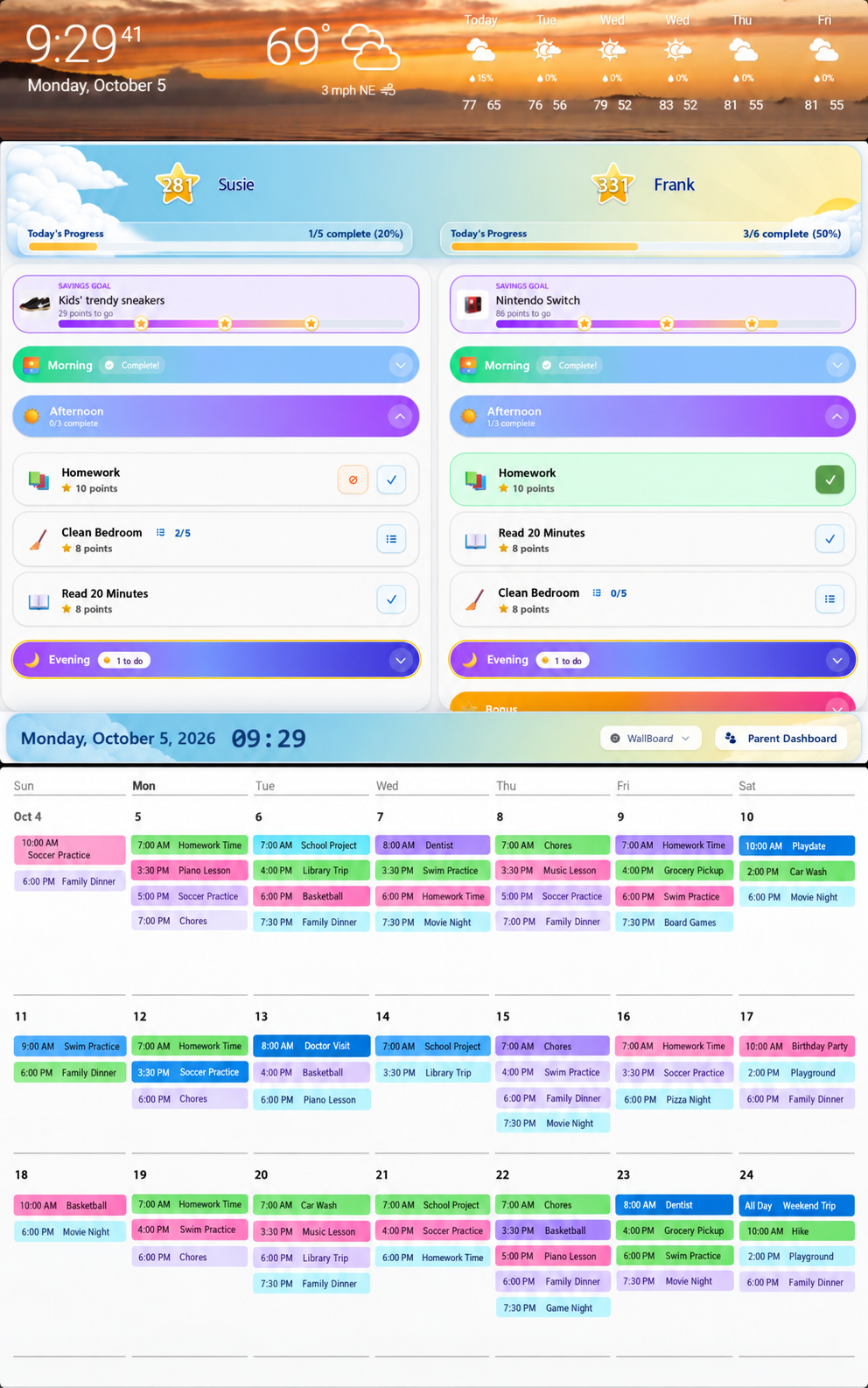
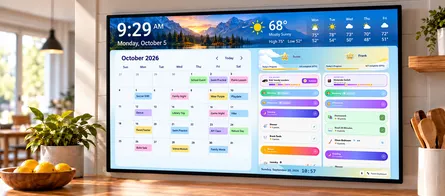
MyChoreBoard embedded directly into a DAKboard Custom Screen. DAKboard lets the chore board become one piece of a larger shared family dashboard.
With a Custom Screen, you can position and resize calendar blocks, weather, photos, websites, Home Assistant, to-do services, custom widgets, and many other integrations. DAKboard currently lists custom HTML/JavaScript widgets, iframe embeds, JSON data, Home Assistant, SmartThings, Google Nest, Todoist, Google Tasks, media services, and many other integrations.
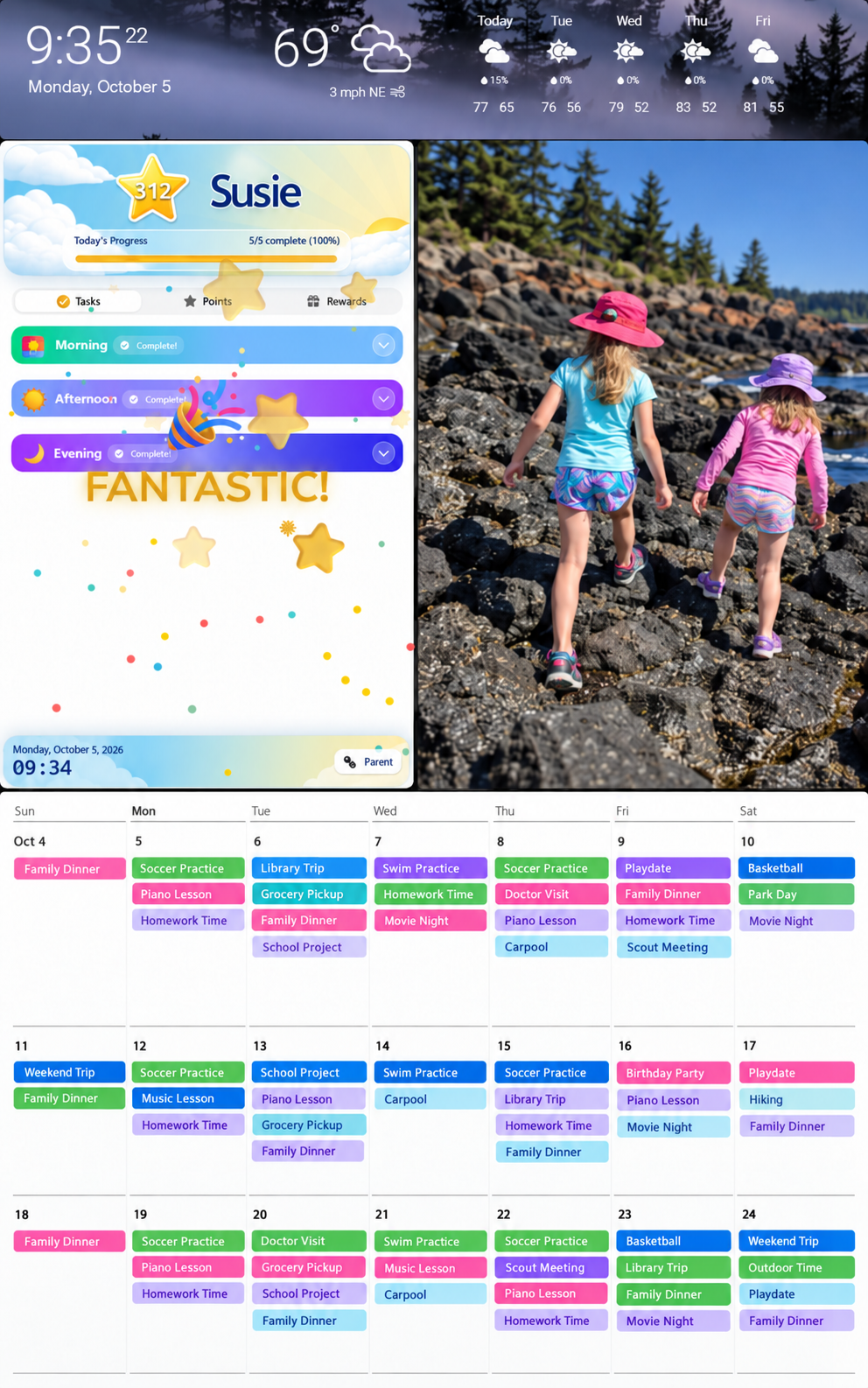
This is the part of DAKboard that is difficult to capture with a simple feature checklist: you decide how much room each part of the command center gets and how the entire screen is organized.
You can build your own Raspberry Pi display, use a DAKboard CPU with a monitor, or buy one of DAKboard’s touch displays.
Read my hands-on setup: How to Add MyChoreBoard to DAKboard.
DAKboard also has its own chores now
DAKboard’s Family Chores Manager includes recurring work, points, rewards, counter chores, family members, and a shared display. I played with it while building the MyChoreBoard integration.
My impression is that it feels more like a capable family task manager with points than a purpose-built chore application for kids. That may be all many households need.
But if chores are a major part of the household system, the Website/iframe block makes DAKboard especially interesting because MyChoreBoard can simply become another resizable part of the dashboard.
The tradeoff is setup and subscription
DAKboard is the most flexible product here, but that flexibility asks more from you during setup.
The free plan is useful for predefined screens and basic TouchHub use. The Essential plan is currently $6/month or $5/month billed annually and unlocks the custom layouts and integrations needed for the MyChoreBoard iframe setup described in my guide.
If all you want to show is MyChoreBoard, I would not pay for DAKboard just to wrap a website. Open MyChoreBoard directly in a browser instead.
DAKboard earns its subscription when MyChoreBoard is one piece of a much larger command center.
Why a simple “chores: yes/no” comparison is misleading
Every major product in this category can now say something about chores, tasks, or routines in its marketing.
That does not mean the systems are interchangeable.
Consider shared household jobs:
- Skylight has Up for Grabs tasks.
- Hearth has Anyone to-dos.
- Cozyla has Compete chores.
- MyChoreBoard has Shared Pool Bonus Tasks.
Those all address a similar household problem—“someone needs to do this”—but they are implemented inside very different models.
The difference becomes even bigger when you ask questions such as:
- Can a required chore be marked N/A for today without changing the schedule?
- Can optional chores be kept separate from required routines?
- Can an optional job be available only on certain days?
- Can a child complete the same earning task multiple times per day with a parent-defined limit?
- Can a job disappear for several days after completion?
- Can a larger responsibility include a checklist of smaller steps?
- Can one shared task disappear for everyone after the first child claims it?
Those are the kinds of questions that led me to build MyChoreBoard as a dedicated chore system rather than treating chores as one tab inside a calendar.
Where MyChoreBoard fits into a family command center
I do not think MyChoreBoard needs to become another digital family calendar.
There are already good products for calendars.
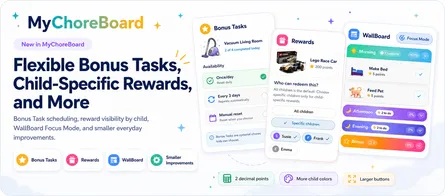
MyChoreBoard’s job is to go deeper on the child responsibility side:
- Morning, Afternoon, and Evening required work;
- optional Bonus Tasks kept separate from the required routine;
- Shared Pool tasks that multiple children can see but only one child can claim;
- advanced recurring scheduling;
- day-of-week availability, daily limits, and cooldown-style Bonus Task rules;
- task instructions and checklists;
- N/A handling for days when a required chore does not apply;
- child-specific rewards;
- Savings Goals;
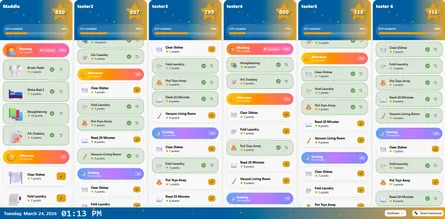
- Child View and WallBoard Mode.
That creates a different product strategy:
Some family command centers include a chore chart. MyChoreBoard is a chore system that can run on your family command center.
On an open display like ApoloSign, MyChoreBoard can be installed as an Android app. On DAKboard, it can be embedded as a Website/iframe block. On a normal tablet, computer, Fire tablet, or browser-capable touchscreen, it can run directly without any command-center subscription at all.
You do not need dedicated family-calendar hardware to build a shared chore station. MyChoreBoard works on the web, iPhone/iPad, Android, and Amazon Fire, and WallBoard Mode is designed for a shared household screen.
Try MyChoreBoard freeWhich family command center would I choose?
My answer changes depending on the family.
I want the simplest polished calendar appliance
Start with Skylight. Its product is focused, mature, and designed around a family using one shared system rather than building their own dashboard.
I would make sure I was comfortable with the Plus subscription if Rewards are important, because that is part of the cost of the experience I would want for chores.
I want routines and child independence to be the center of the product
Look closely at Hearth. Its visual routines, streaks, to-dos, stars, rewards, and kid-focused presentation are more central to the product than they are on many calendar-first systems.
The key decision is whether those features are worth the Family Membership over time.
I want a polished open Android display and do not want to pay monthly for the core family tools
ApoloSign is the option I can personally vouch for. I know MyChoreBoard runs on it because I have done it. The hardware is attractive, Android is genuinely useful, and the standard family tools I tested do not require a monthly subscription.
For a permanent wall-mounted command center, I would lean larger than the 15.6-inch model I own.
I want an all-in-one Android family hub with bigger hardware and deeper native tools
Cozyla belongs on the shortlist. On paper, its combination of Google Play, customizable dashboards, larger displays, chores, routines, rewards, and optional rather than required premium membership is compelling.
My reservation is simple: I have not personally tested it yet. I would rather tell you that than turn a product page into a fake hands-on review.
I want to control everything
DAKboard. It requires more decisions, but there is nothing else in this group I have used that gives me the same degree of control over the actual dashboard.
If you enjoy choosing your own screen, Raspberry Pi, widgets, Home Assistant setup, colors, photos, calendar layout, and exact MyChoreBoard placement, DAKboard is in a different category from the appliance-style products.
Chores are the main reason I am buying a screen
Before buying expensive hardware, I would first try MyChoreBoard on a tablet or browser you already own.
If the family develops the habit of checking it, then decide whether a larger shared command-center display would make the system better.
That sequence prevents the hardware purchase from becoming the solution looking for a problem.
My current shortlist
If I were narrowing the category today, my shortlist would look like this:
- ApoloSign + MyChoreBoard if I wanted a polished, open, no-required-core-subscription setup that I know works.
- DAKboard + MyChoreBoard if customization and a broader home dashboard were the priority.
- Cozyla if I wanted a larger Android-first all-in-one and was willing to test whether its native family tools were enough before adding MyChoreBoard.
- Skylight if I wanted the most straightforward appliance-style calendar experience and preferred staying in one ecosystem.
- Hearth if visual routines and habit-building were the primary goal and I was comfortable with the membership.
That is not a permanent ranking. These products are changing quickly, especially around chores, rewards, AI, and companion apps. I will update this page as the products change and as I get more of them into my own hands.
Frequently asked questions
There is no single best option for every family. Skylight is a strong straightforward calendar appliance, Hearth emphasizes visual routines and habit building, Cozyla combines strong native family tools with Android openness, ApoloSign gives you Android flexibility without a required subscription for its core family tools, and DAKboard is the most customizable. If chore-management depth is the priority, MyChoreBoard can run as the dedicated chore layer on compatible screens.
I have personally tested MyChoreBoard on ApoloSign through Google Play and inside DAKboard using a Website/iframe block. Cozyla supports Google Play, so it is a promising candidate for the Android app, but I have not personally verified that setup yet. I did not find a documented third-party app or website integration for MyChoreBoard on Skylight or Hearth.
It depends on the platform. ApoloSign’s core family tools do not require a subscription. Cozyla Calendar Plus lists its core dashboard, chores, routines, rewards, calendar, and app-store features as free, with optional premium AI features. Skylight requires Plus for Rewards. Hearth uses a Family Membership for routines, to-dos, stars/rewards, and other premium tools. DAKboard has a free plan, but the Custom Screen and Website/iframe setup I use with MyChoreBoard requires Essential.
Yes. If chores and rewards are the main goal, a tablet or browser-capable touchscreen may be all you need. MyChoreBoard WallBoard Mode is designed for a shared display, and parents can continue managing the family from their own phones or browsers.
Not really. Skylight and Hearth are primarily dedicated family-calendar appliances with their own interfaces. DAKboard is closer to a configurable display platform: you choose hardware and assemble a dashboard from calendars, integrations, websites, smart-home tools, photos, weather, and other blocks.

Ready to try MyChoreBoard with your kids?
Install on any phone, tablet or computer. Free with no sign-in hoops.