How Bonus Tasks Work in MyChoreBoard
- Jacob Volk
- MyChoreBoard Guides
- 08 Jun, 2026
Required chores are important, but optional chores can be powerful too.
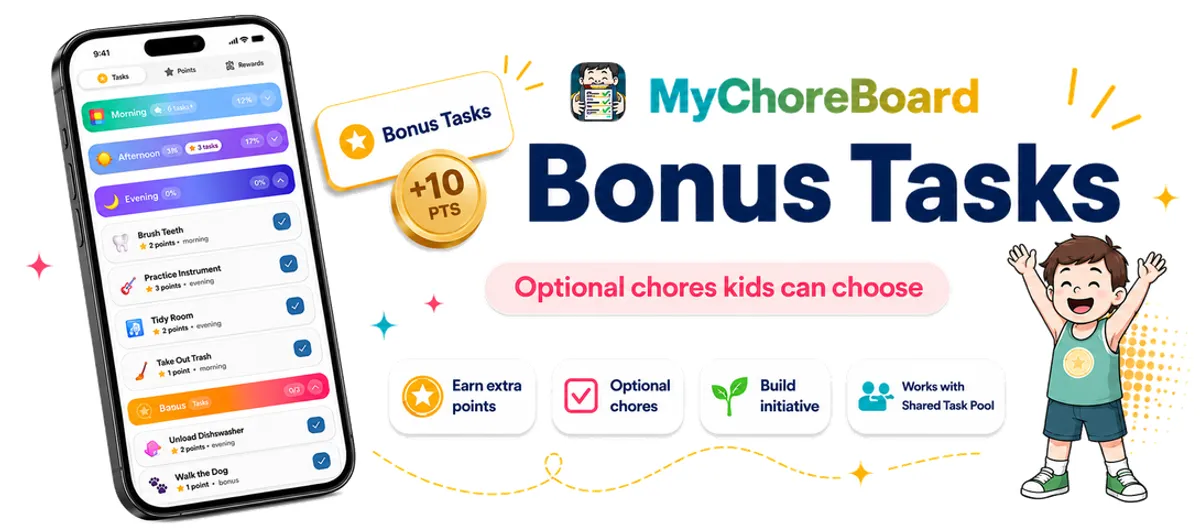
That is why MyChoreBoard includes Bonus Tasks — a separate area for extra chores kids can complete when they want to earn more points.
Bonus Tasks are perfect for families that want to encourage initiative without turning every possible household job into a required daily assignment. Parents can now also control how often each Bonus Task is available, including tasks that can be completed several times per day or only once every few days.
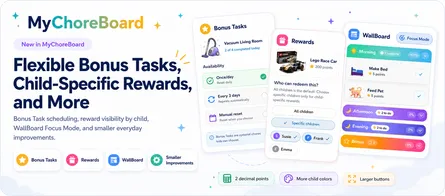
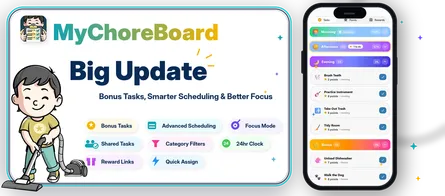
Updated July 2026: Bonus Tasks now support daily completion limits, repeatable tasks, multi-day availability, manual-reset-only tasks, progress indicators, and parent resets. These improvements are part of the latest MyChoreBoard feature release.
What are Bonus Tasks?
Bonus Tasks are optional chores that sit outside the normal Morning, Afternoon, and Evening routine.
A child can complete their regular chores first, then look at the Bonus section when they want extra ways to earn points. This keeps the main routine clean while still giving motivated kids more opportunities.
Think of Bonus Tasks as the digital version of: “If anyone wants to earn extra points, this job is available.”
Why this helps families
Most chore systems run into the same challenge: there are always more helpful jobs around the house than you want to assign every single day. If you add every possible chore to the required routine, kids can start to feel overwhelmed. But if you leave those chores out completely, helpful opportunities often get missed.
Bonus Tasks create a middle ground by keeping the required routine simple while still giving kids clear ways to earn extra points when they feel motivated. Parents can reward initiative without cluttering the main chore list, and kids get more choice, more independence, and a faster path toward the rewards they are working for.
This works especially well as part of a broader positive reinforcement system that builds motivation and responsibility.
Good examples of Bonus Tasks
Bonus Tasks work best for chores that are helpful but not always required from the same child every day.
Examples include:
- Unload the dishwasher
- Take out the trash
- Walk the dog
- Wipe the table
- Tidy the living room
- Fold towels
- Bring laundry downstairs
- Help put away groceries
- Pick up toys in a shared space
- Sweep the kitchen
- Complete extra reading
- Practice an instrument
You can make them small and quick, or make them worth more points when they require more effort.
Choose how often each Bonus Task is available
Different optional jobs need different rules.
A quick household task might be available once each day. Another task may be useful several times in the same day. A larger project might need to disappear for a week before it becomes available again.
MyChoreBoard now gives parents four availability options for Bonus Tasks.
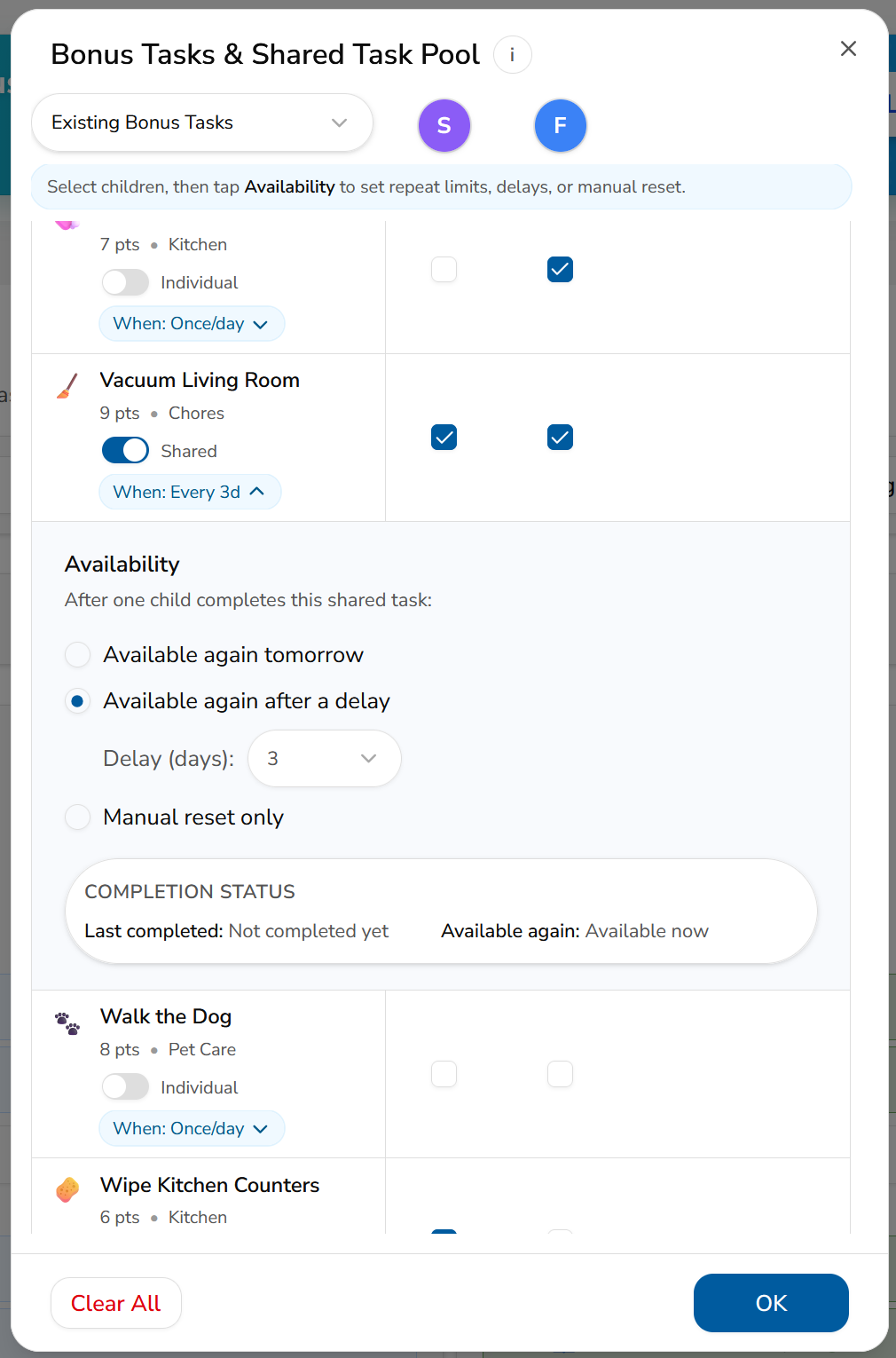
Once per day
This is the simplest option and works like the original Bonus Task behavior.
The child can complete the task once, and it becomes available again on the next day.
Good examples include:
- Unload the dishwasher
- Take out the trash
- Wipe the kitchen table
- Complete an extra reading session
Multiple times per day
An Individual Bonus Task can be made available more than once during the same day. Parents choose the maximum number of completions allowed each day.
This works well when the same type of helpful action may happen repeatedly.
Examples include:
- Help with up to three loads of laundry
- Complete up to four extra reading sessions
- Put away shared items several times
- Practice a skill in multiple short sessions
- Help with several small household jobs
The child interface shows progress such as 2 of 4 completed today, making the remaining opportunities clear.
After a selected number of days
Some optional chores should not return every day.
Parents can set a multi-day availability period so the Bonus Task becomes available again only after the selected number of days has passed.
Examples include:
- Clean the car every seven days
- Organize a closet every fourteen days
- Help clean the garage every thirty days
- Complete a larger yard project once each week
- Deep-clean a shared space occasionally
This keeps larger or less frequent jobs visible in MyChoreBoard without requiring parents to recreate or reassign them each time.
Manual reset only
Some opportunities should not return on a timer at all.
With Manual reset only, the Bonus Task becomes unavailable after it is completed and stays unavailable until a parent deliberately resets it.
This can work well for:
- A special project a parent wants to offer occasionally
- A one-time organizing or cleaning job
- A task that should return only after a parent checks the result
- A limited extra-earning opportunity
- A household job whose timing depends on real life rather than a schedule
For an Individual Bonus Task, the parent resets availability separately for each child. For a Shared Pool task, the parent resets the shared opportunity so it becomes available to the selected children again.
Bonus Task availability vs recurring chore scheduling
Bonus Task availability and recurring chore scheduling solve different problems.
Use Bonus Task availability to control how often a child may choose and complete an optional job.
Use recurring chore scheduling when a task is a required responsibility that should appear on a planned schedule, such as every other day, every Tuesday, or every third week.
For required routines with more complex patterns, see Smarter Recurring Chore Scheduling for Families.
Bonus Tasks vs regular assigned chores
Use regular assigned chores for responsibilities that truly need to happen as part of the child’s routine.
Use Bonus Tasks for extra opportunities.
| Use regular chores for | Use Bonus Tasks for |
|---|---|
| Brush teeth | Unload dishwasher |
| Pack backpack | Walk the dog |
| Make bed | Fold towels |
| Homework routine | Wipe counters |
| Feed pet on assigned day | Pick up shared space |
This separation keeps the child interface clearer. Kids know what they must do, and they can still see what they can do for extra points.
Works even better with Shared Task Pool
Bonus Tasks pair nicely with Shared Task Pool.
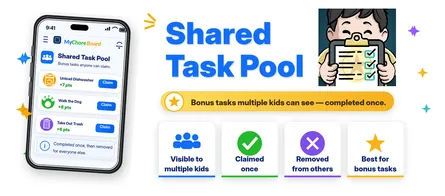
A shared bonus task can appear for more than one child. Once one child completes it, the task becomes unavailable to the others based on the availability rule you selected.
That makes it great for “whoever gets to it first” jobs, like unloading the dishwasher or taking out the trash.
Read more: What is a Shared Task Pool?.
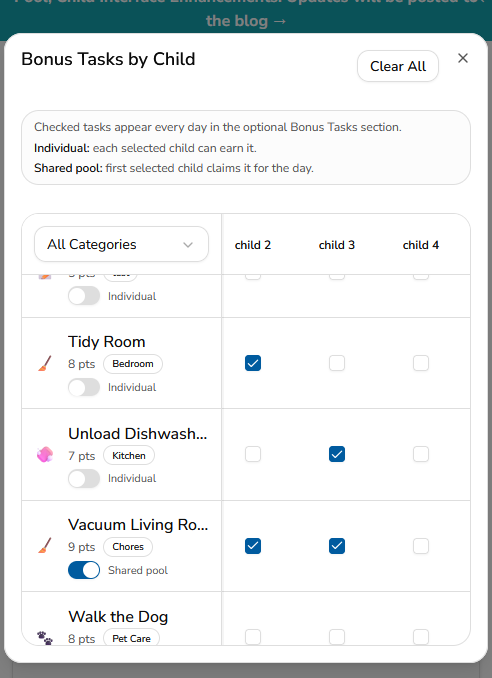
How to set up Bonus Tasks
Bonus Tasks are managed from the Task Assignments screen in the parent area.
To set them up:
- Open the Parent Dashboard.
- Go to Assignments.
- In the Tools section, tap Bonus Tasks & Shared Task Pool.
- Find the task you want to make available as a Bonus Task.
- Check the box under each child who should see that task.
- Choose whether the task should be Individual or part of the Shared Pool.
- Open the task’s availability settings.
- Choose once per day, multiple times per day, after a selected number of days, or manual reset only.
- If needed, choose the daily completion limit or number of days before the task returns.
Once selected, the task will appear in the child’s optional Bonus section whenever it is available.
Individual Bonus Tasks vs Shared Pool
When you add a Bonus Task, you can choose how it should work.
Individual
Use Individual when each selected child can complete the task separately.
For example, if you choose “Tidy Room” for two kids, each child can complete their own version of that task and earn the points.
Each child has their own availability and completion history. One child completing the task does not remove it from another child.
Individual Bonus Tasks can also be configured for multiple completions during the same day.
This works well for chores like:
- Tidy room
- Read for 20 minutes
- Practice piano
- Organize backpack
- Put away personal laundry
Shared Pool
Use Shared Pool when the task should be available to more than one child, but only one child should get credit for doing it.
For example, if “Vacuum Living Room” is available to two kids, both kids can see it. Once one child completes it, the task is claimed and removed from the other children’s Bonus sections until it becomes available again.
This works well for chores like:
- Unload dishwasher
- Take out trash
- Vacuum living room
- Walk the dog
- Wipe kitchen table
- Bring laundry downstairs
Shared Pool is helpful when you want to encourage initiative without assigning the same shared household job to every child.
Multiple-times-per-day availability is designed for Individual Bonus Tasks. Shared Pool tasks remain one shared opportunity each time they become available.
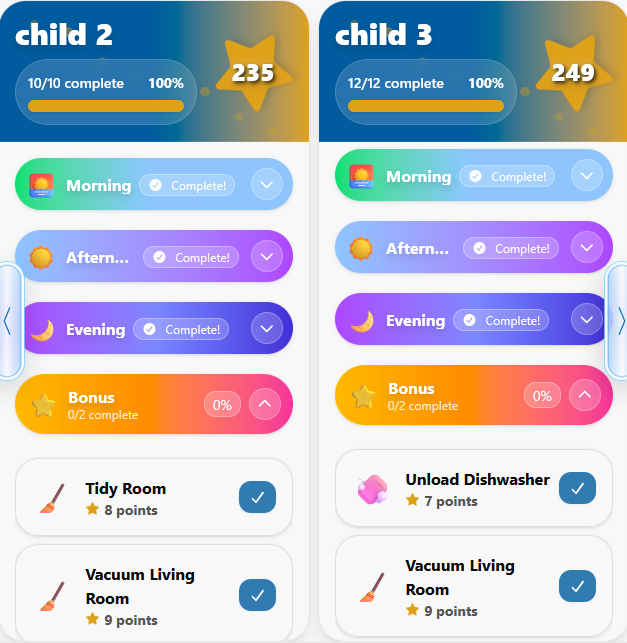
What kids see
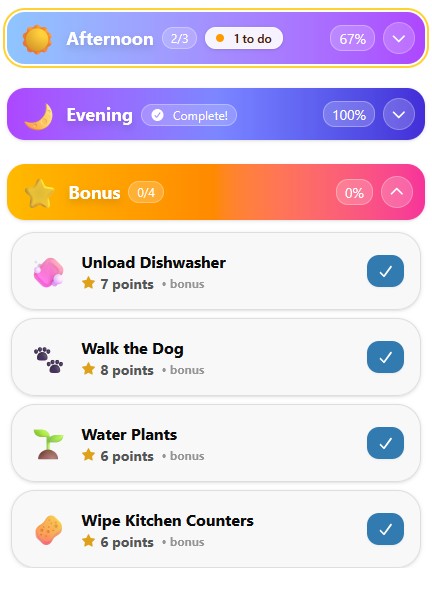
On the child screen, Bonus Tasks appear in their own Bonus section underneath the regular Morning, Afternoon, and Evening routine.
Kids can expand the Bonus section, choose an available task, and tap the completion button when they finish it.
For repeatable Bonus Tasks, the app can show progress toward the daily limit, such as 2 of 4 completed today.
When a task reaches its daily limit, is waiting for its multi-day availability period to end, or is set to Manual reset only after completion, it is hidden from the child until it becomes available again. This keeps the Bonus section focused on tasks the child can actually choose right now.
Bonus Tasks do not clutter the main daily routine. They stay separate so kids can clearly tell the difference between:
- chores they are expected to complete
- extra chores they can choose to do for more points
Resetting a Bonus Task
A parent reset can serve two different purposes.
For a task using Manual reset only, the task will not return by itself. The parent must reset it before the child or children can see and complete it again.
For a task using an automatic option—once per day, multiple times per day, or after a delay—a parent can still reset it early when plans change.
A parent can reset an Individual Bonus Task for a specific child. A Shared Pool task is reset as one shared opportunity for the selected children.
An early reset can help when:
- A completion was recorded by mistake
- A job needs to be repeated earlier than expected
- The family’s schedule changed
- A parent wants to offer an extra opportunity
The selected availability setting remains in place for future completions.
A few important notes
Bonus Tasks come from your existing Task Library. To change a task’s name, icon, category, or point value, edit it in the Task Library first.
Only checked children will see a Bonus Task.
An Individual Bonus Task tracks availability separately for each child. A Shared Pool task is one shared opportunity across the selected children.
Changing a task between Individual and Shared Pool changes how availability is tracked, so review the availability setting after making that switch.
Use Clear All carefully. It removes the current Bonus Task selections so you can start over, but saved availability settings remain available if the task is selected again.
For younger kids, it is usually better to start with only a few Bonus Tasks. Older kids may enjoy having more choices.
Tips for using Bonus Tasks well
Start small. Add a few bonus chores your kids understand and can complete without a lot of explanation.
Then adjust based on what happens:
- If kids ignore them, increase the point value or choose more interesting jobs.
- If one child claims everything, use Shared Pool carefully or create Individual opportunities too.
- If a repeatable task is being completed too often, lower its daily limit.
- If a larger task returns too quickly, increase the number of days before it becomes available again.
- If a task should return only when you decide, use Manual reset only.
- If the section gets crowded, remove tasks that are not being used.
- If younger kids are overwhelmed, keep bonus choices limited.
The goal is not to create a giant menu. The goal is to make extra helpful work visible and rewarding.
A better way to encourage initiative
Bonus Tasks are not about adding pressure. They are about creating a clear path for kids who want to do more.
When a child asks, “How can I earn more points?” the answer is right there in the app.
Frequently asked questions
No. Bonus Tasks are optional chores kids can complete when they want to earn extra points.
Yes. Individual Bonus Tasks can allow multiple completions per day. Parents choose the maximum daily completion limit.
Yes. Parents can set a multi-day availability period so an occasional task returns after the selected number of days.
Yes. A Bonus Task can be shown to more than one child. You can choose whether each child completes it individually or whether it is one shared opportunity in the Shared Pool.
Individual Bonus Tasks track completion and availability separately for each selected child. Shared Pool Bonus Tasks are available to multiple children, but one child’s completion makes the shared opportunity unavailable to the others until it returns.
Yes. Choose Manual reset only. After the task is completed, it stays unavailable until a parent resets it. Individual tasks are reset per child, while a Shared Pool task is reset as one shared opportunity.
Yes. Parents can make an Individual task available again for a specific child or reset a Shared Pool task for the selected children when plans change. The task keeps its existing availability setting for future completions.
The child can see progress toward the limit while the task is available. After the limit is reached, the task is hidden until it becomes available again.
Bonus Tasks use tasks from the Task Library. Create or edit the task name, icon, category, and point value there, then go to Assignments and open Bonus Tasks & Shared Task Pool to choose children, task type, and availability.

Ready to try MyChoreBoard with your kids?
Install on any phone, tablet or computer. Free with no sign-in hoops.