New in MyChoreBoard: Reward Notifications, Task Checklists, One-Time Tasks, and More
- Jacob Volk
- Product Updates , MyChoreBoard Guides
- 30 Sep, 2026
Make chores clear. Keep rewards motivating. Give kids more independence.
That is the goal behind MyChoreBoard, and version 1.8.0 adds several new ways to make it happen.
The biggest addition is Reward Redemption Notifications, so parents can know when a child redeems a reward without repeatedly checking the Parent Dashboard. This release also adds Task Checklists, One-Time Tasks, Spanish and French language support, more flexible Bonus Tasks, a new Clear Tasks Tool, reusable presets for manual point adjustments, and several smaller improvements throughout the parent and child experience.
It also includes better feedback when a device temporarily loses its connection and improvements to occasional slow app startup.
The result is a chore system that can give kids clearer expectations while giving parents more flexibility when real family life changes the plan.
What is new in MyChoreBoard 1.8.0
Notifications
Know when a reward is redeemed
Receive a notification on a supported parent device when a child redeems a reward.
Languages
Use MyChoreBoard in Spanish or French
Families can now use MyChoreBoard in English, Spanish, or French.
Task Checklists
Turn a big chore into clear steps
Add smaller checklist items that kids can work through one step at a time.
One-Time Tasks
Assign it once without saving it forever
Create a task for a specific date without adding another reusable chore to the Task Library.
Bonus Tasks
Choose which days a Bonus Task appears
Keep optional earning opportunities aligned with the days they actually make sense.
Clear Tasks
Handle vacations, sick days, and changed plans
Clear unfinished assignments for a date without changing the recurring schedules behind them.
Point Presets
Reuse common bonuses and deductions
Save the point adjustments you use regularly instead of entering the same details every time.
Get notified when a child redeems a reward
Reward Redemption Push Notifications are here!!!!
When a child redeems a reward, a parent can receive a push notification instead of needing to periodically check whether something is waiting in the Parent Dashboard. It is especially helpful when a child uses MyChoreBoard independently on their own phone, tablet, or a shared household display while the parent manages the family from another device.
Before you start
Notifications are currently available only in the MyChoreBoard iOS and Android apps. They do not work in the web app or PWA.
They also work only on a device saved as a Parent device. This makes sure reward alerts go to the person who can approve, fulfill, or refund them.
Turn on Reward Redemption Notifications
- Open MyChoreBoard in the iOS or Android app on the device where you want to receive alerts.
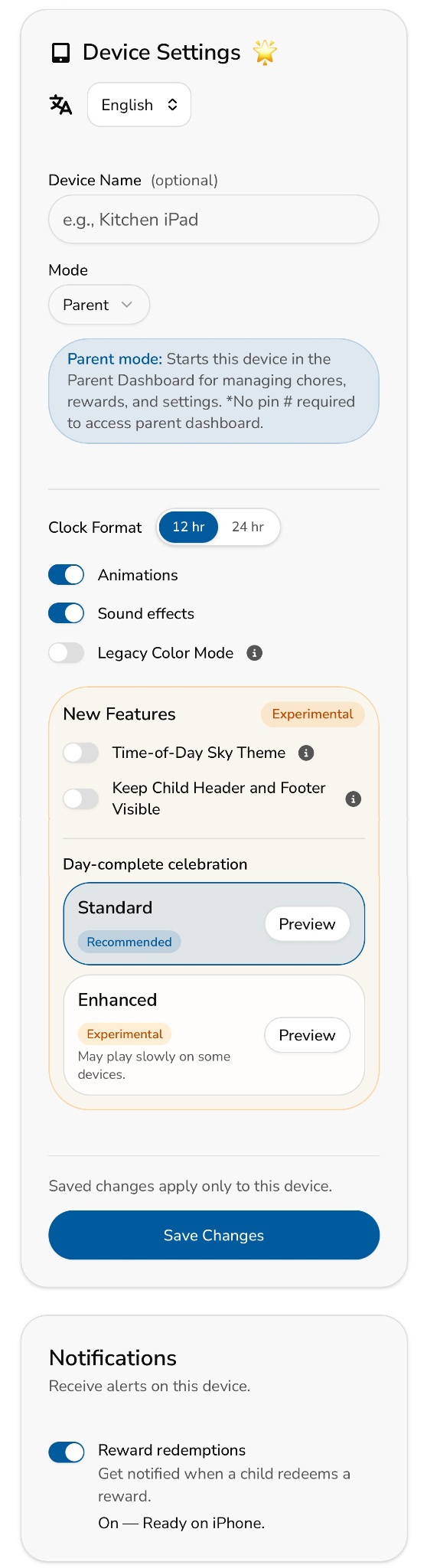
- Go to Device Settings and set the device Mode to Parent, then select Save Changes.
- Scroll to Notifications and turn on Reward redemptions.
- When your iPhone or Android device asks for permission, choose Allow.
The app will show that notifications are ready on that device once setup is complete. If you previously declined the operating system’s permission request, turn notifications back on for MyChoreBoard in your phone or tablet’s system settings, then return to the app.
The child can continue handling chores and rewards independently, while the parent still knows when a reward needs attention.
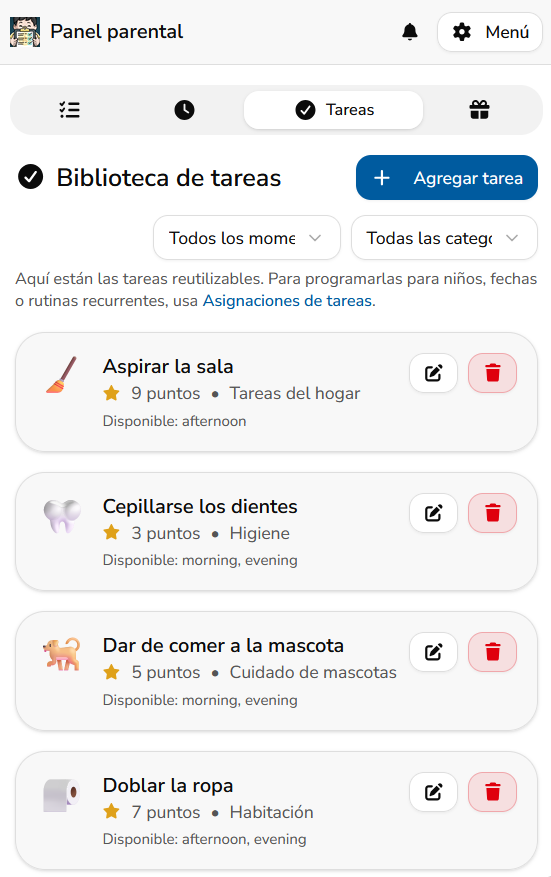
MyChoreBoard is now available in Spanish and French
MyChoreBoard can now be used in English, Spanish, or French.
Families can choose the language that works best for the device they are using while keeping the same family chore system, children, tasks, points, and rewards.
That can be useful for multilingual households, families who are more comfortable managing routines in another language, or a child who would benefit from seeing their chore board in Spanish or French.
The goal is the same in every language: give kids a clear view of what they need to do and give parents a system they do not have to constantly manage.
Spanish and French are the first additional languages in MyChoreBoard, and we plan to continue expanding language support as the app grows.
Break bigger chores into Task Checklists
Some chores are easy to understand from the name alone.
Feed the dog is usually pretty clear.
Clean your room can mean something very different depending on who you ask.
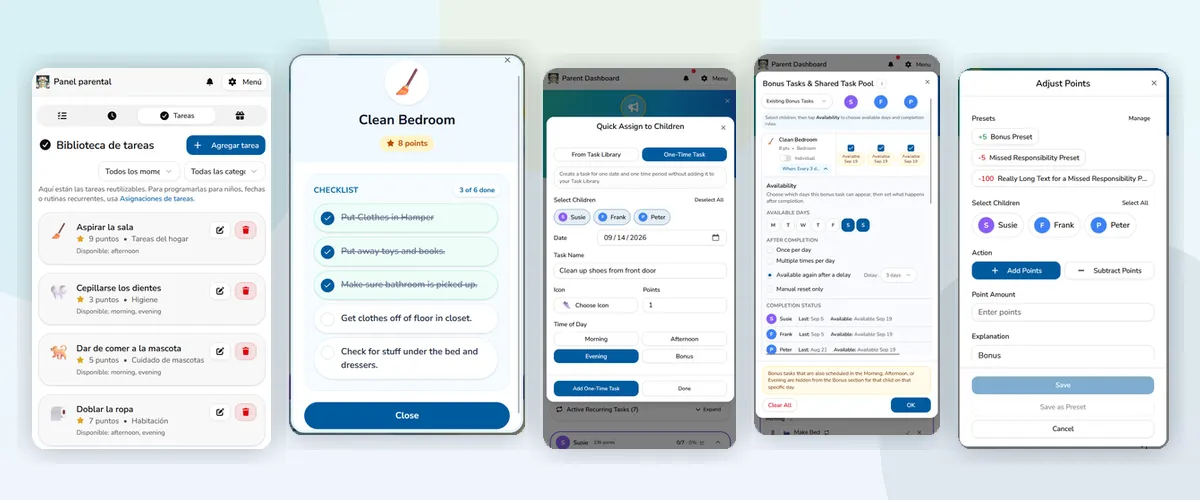
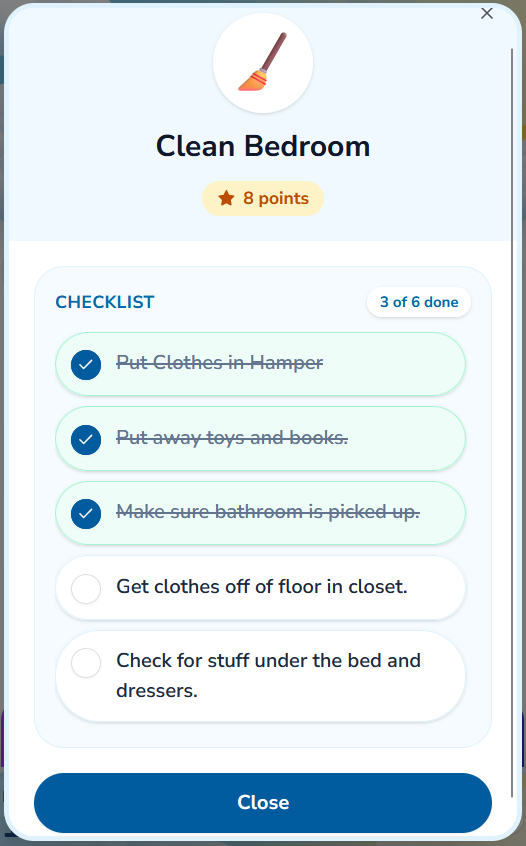
With Task Checklists, parents can break a larger chore or routine into smaller steps that kids can check off as they go.
A Clean Bedroom task might include:
- Put clothes in the hamper
- Put toys and books away
- Pick up anything that belongs in another room
- Check under the bed
- Clear the floor
- Make the bed
Instead of repeatedly explaining what is still missing, the expectations can live directly inside the task. The child gets a clear sequence to work through and can see their progress as each step is completed.
Once all checklist items are finished, MyChoreBoard can complete the overall task as part of the same flow.
Task Checklists are useful for more than cleaning. They can turn morning routines, bedtime routines, getting ready for school, packing for an activity, bathroom cleanup, pet care, or other multi-step responsibilities into something much easier for a child to follow independently.
This is one of the clearest examples of what we want MyChoreBoard to do: replace repeated reminders with expectations kids can actually see.
Quickly assign a One-Time Task
Not every chore belongs in the Task Library.
Sometimes someone needs to bring in the groceries, clean their shoes before tomorrow, help get ready for guests, pack for a trip, or take care of a job that may never happen again.
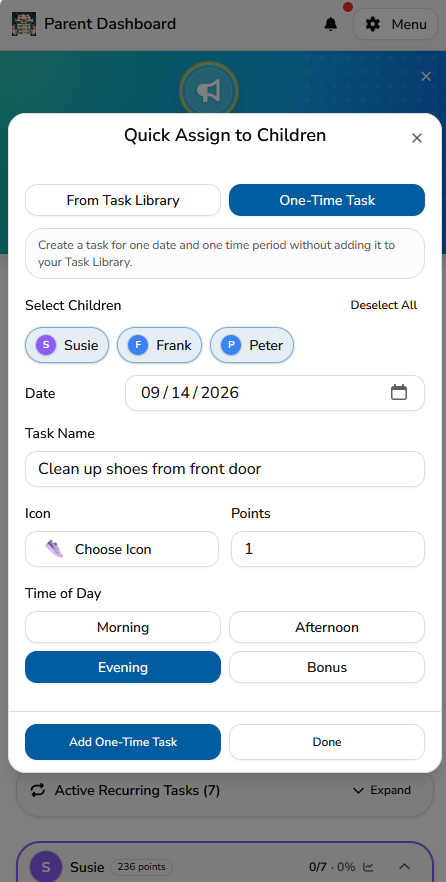
One-Time Tasks let parents create a task for a specific date and time period without adding it to the reusable Task Library.
From Quick Assign, choose One-Time Task, select the child or children, choose the date and time of day, enter the task, and assign it.
The task appears when it is needed, but the Task Library stays focused on the chores and routines you actually expect to use again.
Recurring chores are still the best fit for responsibilities that happen on a schedule. One-Time Tasks are there for everything else.
For more about building repeating schedules, see Advanced Recurring Chore Scheduling in MyChoreBoard.
Bonus Tasks can now follow your family’s week
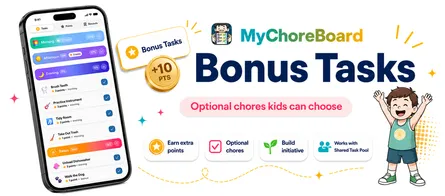
Bonus Tasks give kids optional ways to earn extra points without turning every possible job into a required daily chore.
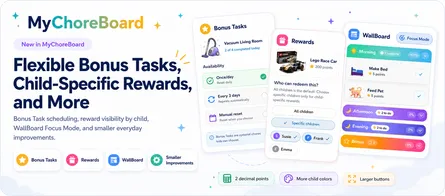
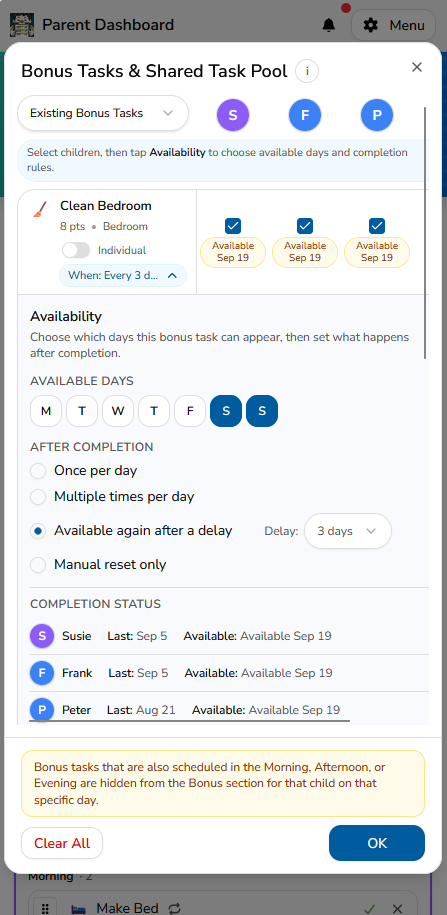
Now parents can also choose which days of the week an individual Bonus Task is available.
That matters because optional jobs often follow the family’s real schedule.
A larger household cleanup may only make sense on Saturday. A trash-related job may only be available before collection day. Another opportunity might belong on weekdays but not the weekend.
Instead of repeatedly enabling and removing those tasks, parents can choose the appropriate days once and let MyChoreBoard handle the schedule.
This builds on the flexible Bonus Task controls already available for once-per-day, multiple-times-per-day, delayed return, and manual-reset opportunities.
See assigned Bonus Tasks from the Parent Assignment area
This release also makes existing Bonus Task assignments easier to understand from the parent side.
Assigned Bonus Tasks now appear in the Parent Assignment area with information about the children connected to the task and its current availability or completion status.
That gives parents a clearer picture of what is already configured without having to switch between as many parts of the app.
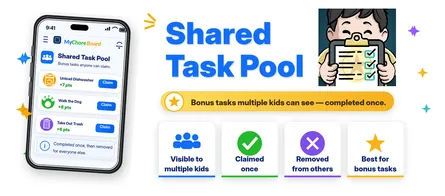
For jobs that multiple children can see but only one child can claim, you can continue combining Bonus Tasks with the Shared Task Pool.
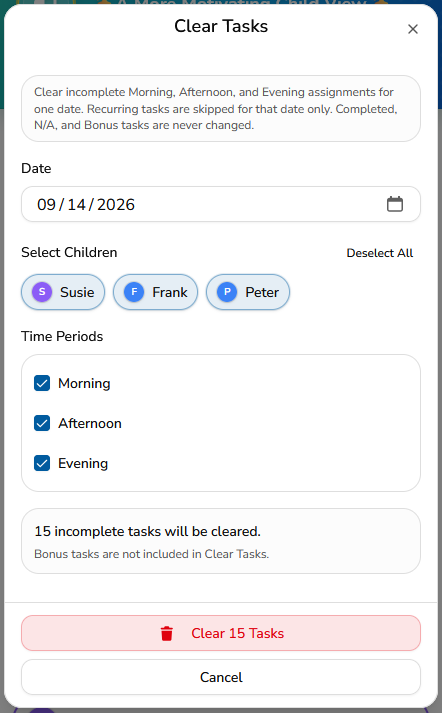
Clear a day without rebuilding the routine
Recurring schedules are useful because parents should not have to recreate the chore list every morning.
But sometimes the normal routine simply does not apply.
- Someone is sick
- The family is on vacation
- The kids are staying somewhere else
- School is unexpectedly cancelled
- The day’s schedule changed
- Everyone just needs a break from the normal routine
The new Clear Tasks Tool lets a parent clear incomplete Morning, Afternoon, and Evening assignments for a selected date.
You can choose which children and time periods should be affected before anything is cleared.
Importantly, this does not dismantle the schedules that created those tasks. Recurring tasks are simply skipped for that date. Completed tasks, tasks already marked N/A, and Bonus Tasks are not changed by the Clear Tasks Tool.
That means you can clear a vacation day or sick day without trying to remember how every recurring chore was configured when the normal routine resumes.
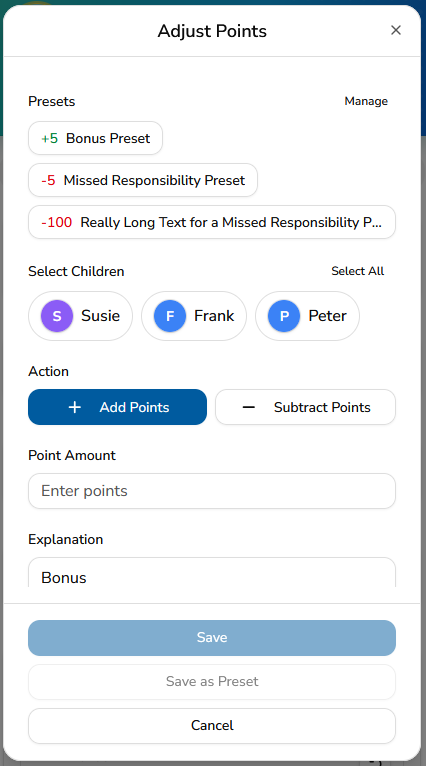
Save presets for common point adjustments
Earlier this year, MyChoreBoard added the ability for parents to manually add or subtract points when something happens outside the normal chore list.
Version 1.8.0 makes that tool faster for adjustments you use repeatedly.
Parents can now create point adjustment presets for common bonuses or deductions.
For example, a family might save presets such as:
- +5 Bonus
- +10 Extra Effort
- -5 Missed Responsibility
- Another adjustment that matches the family’s own point system
Instead of re-entering the same action, point value, and explanation each time, select the preset and apply it to the appropriate child or children.
Presets are parent-created, so each family can decide which recurring situations are worth saving.
You can also create a new adjustment normally and choose Save as Preset when you know it is something you will use again.
This keeps manual points flexible without turning repeated adjustments into repeated data entry.
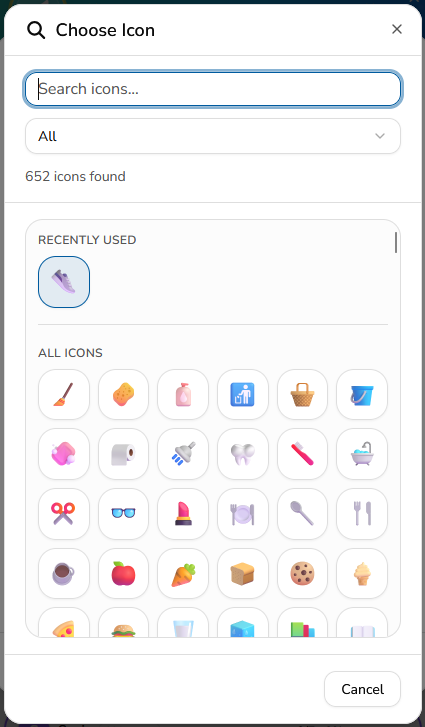
More icons for chores, routines, and rewards
Visual cues can make a chore board much easier for kids to scan, particularly for younger children and early readers.
This release significantly expands the MyChoreBoard emoji and icon library, giving parents many more choices when setting up tasks and routines.
The icon picker also makes it easier to search the expanded collection and get back to icons you have used recently.
A good icon does not replace the task name, but it can help a child recognize brush teeth, feed the pet, clean up, get dressed, or another familiar routine before they have read every word on the screen.
If your child benefits from a more visual interface, you can also combine task icons with the larger child layouts and other options described in our MyChoreBoard Settings guide.
Smaller changes that make the daily routine easier
A few other improvements in 1.8.0 are less flashy but should make MyChoreBoard easier to manage and easier for kids to use every day.
Filter larger recurring-task lists
The existing Recurring Tasks card now includes filtering, which makes it easier to narrow down a larger collection of scheduled chores instead of scrolling through everything.
For families with several children or more detailed routines, small management improvements like this can save a surprising amount of time.
Hide empty time periods for an individual child
Parents can now choose to hide day periods that do not contain any tasks for a child.
MyChoreBoard still supports Morning, Afternoon, Evening, and Bonus sections, but a child who only has Morning and Evening chores does not have to see an empty Afternoon section unless the parent wants the full structure visible.
The setting is controlled per child, so siblings can use different layouts based on what works best for them.
Clearer feedback when the connection is interrupted
MyChoreBoard now gives children more visible feedback during moments when the device temporarily loses connectivity.
The goal is simple: if the app is having trouble communicating, the child should not be left wondering whether their action registered.
Improvements to occasional slow startup
We have also improved parts of the app’s startup process to address occasional cases where MyChoreBoard could take much longer than expected to finish loading from a cold start.
These behind-the-scenes changes are not as visible as Task Checklists or One-Time Tasks, but reliability matters when MyChoreBoard is something a family expects to open and use throughout the day.
Built for real family routines
The goal with MyChoreBoard is not to create the most complicated chore system possible.
It is to make expectations clearer and give kids a system they can increasingly manage for themselves.
Sometimes that means breaking Clean Your Room into six clear steps.
Sometimes it means assigning a job once and never putting it in the Task Library.
Sometimes an optional chore should only appear on Saturday.
Sometimes the normal routine needs to disappear for a sick day.
Sometimes a parent uses the same five-point bonus often enough that it should be one tap away.
And sometimes the parent simply needs to know that a child redeemed the reward they worked toward.
Those are the kinds of real-life situations we focused on in MyChoreBoard 1.8.0.
From first chores to greater independence, MyChoreBoard gives kids a clear system they can understand and parents a chore routine they do not have to constantly manage.
Less nagging. Clearer expectations. More capable kids.
Frequently asked questions
Yes. MyChoreBoard now supports English, Spanish, and French.
Task Checklists let parents break a larger chore or routine into smaller steps that kids can check off as they go. They are useful for jobs such as cleaning a room, getting ready for school, bedtime routines, pet care, and other responsibilities with multiple steps.
Yes. One-Time Tasks are designed for jobs that only need to be assigned for a particular date. They can be created from Quick Assign without adding another reusable task to the Task Library.
Yes. Parents can now choose which days of the week a Bonus Task is available, while continuing to use the existing controls for how often the task can be completed and when it becomes available again.
The Clear Tasks Tool clears incomplete Morning, Afternoon, and Evening assignments for the selected date, children, and time periods. It does not change the recurring schedules behind those tasks, and completed, N/A, and Bonus Tasks are left unchanged.
Yes. Parents can save commonly used additions or deductions as presets, including the point value and explanation, so they can be reused without entering the same adjustment from scratch each time.
Yes. Reward Redemption Notifications can alert a parent when a child redeems a reward. They are available only in the MyChoreBoard iOS and Android apps, not the web app or PWA. Set the device to Parent in Device Settings, save the change, turn on Reward redemptions in the Notifications section, and allow the operating system notification permission when prompted.
Yes. Parents can enable a child-specific setting that hides day periods without tasks. Other children in the family can keep the full daily layout if that works better for them.

Ready to try MyChoreBoard with your kids?
Install on any phone, tablet or computer. Free with no sign-in hoops.