What’s New in MyChoreBoard: Progress Charts, Big Icons & a Smoother Experience
- Jacob Volk
- Product Updates
- 22 Oct, 2025
We’ve been busy behind the scenes making MyChoreBoard even more helpful for families.
This update adds two major new features — and a few invisible improvements — that make tracking chores and rewards simpler, clearer, and more fun for kids.
These improvements were all inspired by feedback from real MyChoreBoard families — parents who wanted clearer progress tracking, easier child views, and a smoother daily routine experience.
If you are new here, take a look at our The Ultimate Guide to Free Chore Apps.
New: Progress & Points Dashboard
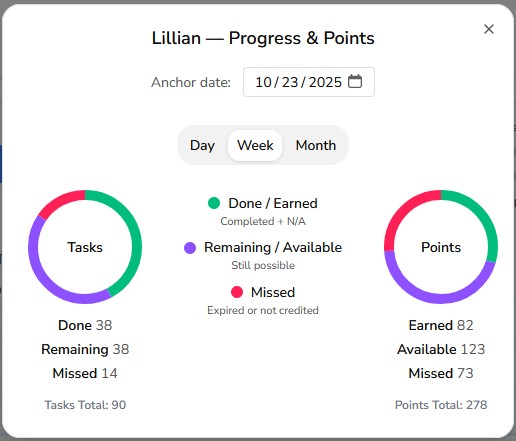
Parents and kids can now see at a glance how things are going with the new Progress & Points view.
Switch between Day, Week, and Month to visualize completed tasks, remaining opportunities, and missed points.
Each child’s chart updates automatically as chores are done (or skipped), so everyone knows exactly where they stand.
Highlights:
- View daily, weekly, or monthly progress
- See Done, Remaining, and Missed totals instantly
- Separate pies for Tasks and Points
- Smart color coding for quick scanning
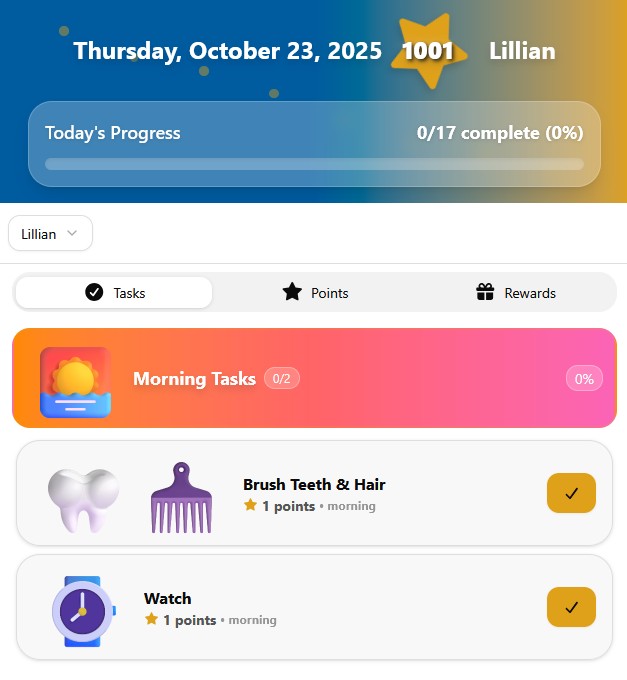
Big Icon Mode (for Non-Readers)
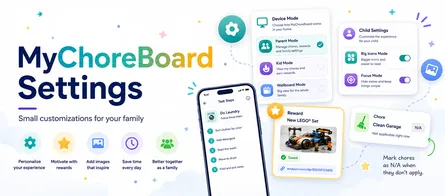
Younger kids or early readers can now enjoy an easier-to-tap interface with Big Icons Mode.
Turn it on under Edit Child → Big Icons Mode to enlarge icons and touch targets — perfect for small hands.
Text stays the same size, but chores become bolder and more accessible.
Parents can customize this per child, so older siblings keep their normal view while younger ones get an easier one.
Small Fixes, Big Improvements
We also cleaned up a few edge-case bugs (the kind only developers lose sleep over).
These changes make chore tracking faster and more reliable, even in rare sync situations or when using MyChoreBoard offline.
Try It Out
Log in to your Parent Dashboard and:
- Open Assignments on your Parent Dashboard and tap the Progress Pie Chart to open their Progress & Points view
- Try switching between Day, Week, and Month
- If you have a younger child, toggle Big Icons Mode in Edit Child and see how it looks
We’re continuing to build MyChoreBoard with real families in mind — keeping it simple, flexible, and fun for kids of all ages.
Open MyChoreBoard to explore the new features today.
FAQ
- The October 2025 update adds a Progress & Points dashboard, Big Icons Mode, and several background improvements to make daily routines smoother.
- All families automatically — no app-store update needed. Just refresh or reopen MyChoreBoard to see the latest changes.
- Open Assignments on your Parent Dashboard and tap the Progress Pie Chart. You can switch between Day, Week, and Month.
- Go to Edit Child, then toggle Big Icons Mode on or off. It’s saved per child, so younger kids can have larger buttons while older kids keep the standard layout.
- Yes. Whether you’re on a tablet, phone, or desktop, the new views and icon settings work automatically. Be online at least once to sync updates.
Ready to try MyChoreBoard with your kids?
Install on any phone, tablet or computer. Free with no sign-in hoops.